In this guide
Rostara sends push notifications to every device a player is signed in on: browsers, iPhones and Android phones. All nine kinds are on by default. Each player can switch any of them off for each group, and nobody is notified about their own action, such as the organizer who created the game.
Every notification, and who gets it
| Setting | The notification | Who gets it, and when |
|---|---|---|
| Event Goes Live | "New event: {game}" with the location | Every member except the organizer who created it, when a game is created live or when a scheduled game's go-live time arrives. |
| RSVP Closed | "RSVP closed: {game}" | Members who answered Going or Maybe, and the waitlist, when RSVPs close at the deadline or are closed by an organizer. |
| Waitlist Promotion | "You're in!" | A player moved from the waitlist to Going, or the member whose guest was moved in. |
| Teams Published | "Teams are out: {game}" | Members who answered Going, when the organizer publishes teams or the roster. |
| Payment Status | "Payment approved" or "Payment declined" | The member who recorded the payment, when an organizer decides. |
| Balance Alerts | "Balance update" | Members in a new charge whose balance is now below zero. |
| New Notices | "New notice in {group}" with the title | Every member except the author. |
| Warnings & suspensions | "You received a warning", "You have been suspended", "Your suspension has ended" | The member concerned. |
| Moderation alerts (admins) | "Moderation update" | The group's other organizers, when a warning or suspension includes "Notify other admins". Only organizers see this setting. |
Notifications are not sent when a game is edited, cancelled or deleted, or when an organizer taps Go Live Now. For those, post a notice, which notifies everyone.
Choose your notifications
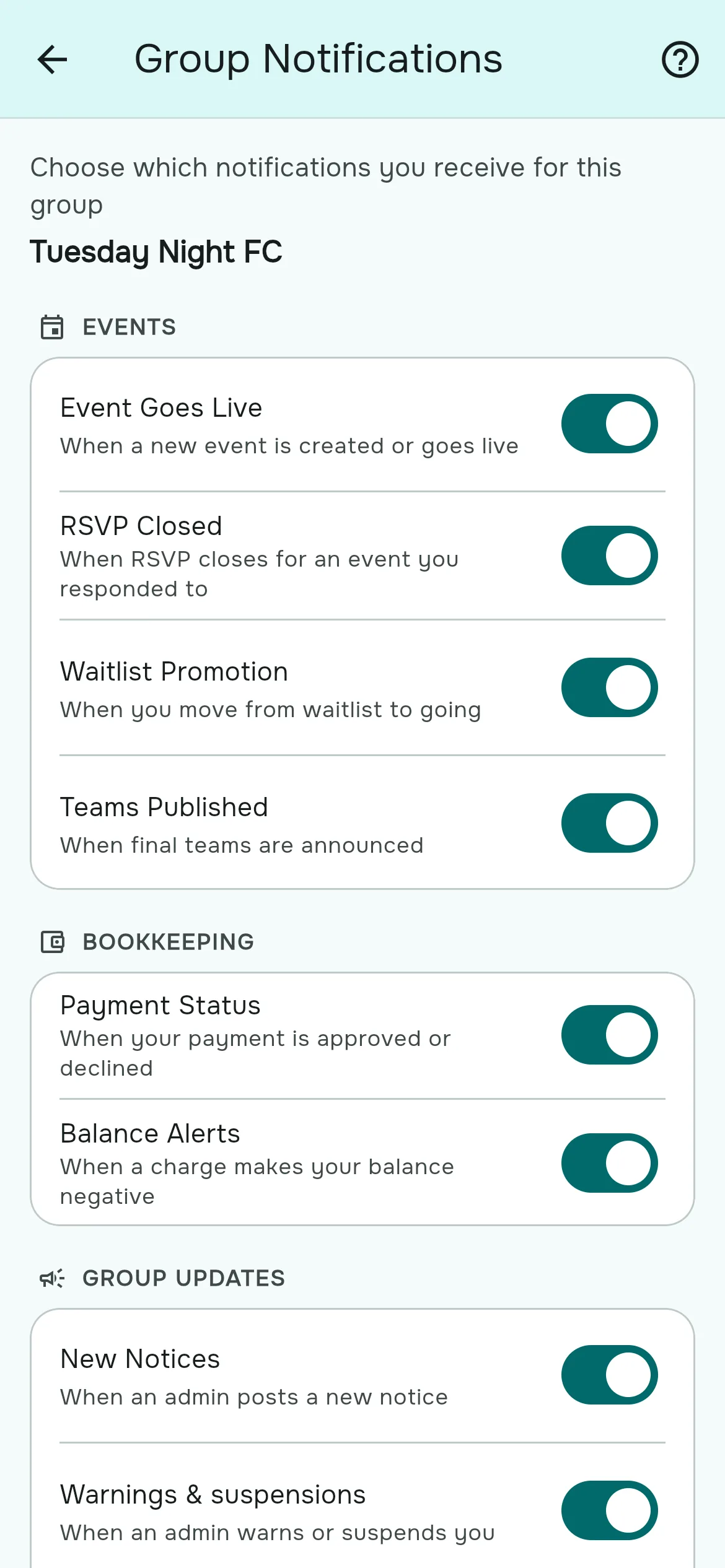
- Open the menu (☰) and, under Group, tap Notifications.
- The page shows the switches for the group you are in, under Events, Bookkeeping and Group updates.
- Flip any switch. It saves immediately.
- To change another group, switch to it first (☰ → My Groups) and open Notifications again.
Allow notifications on your device
- Rostara asks for permission right after you sign in. Allow it on each device you use.
- If you blocked it in a browser, open the site settings for rostara.app (the icon to the left of the address bar), set Notifications to Allow, and reload the page.
- In the iPhone or Android app, go to your phone's Settings → Rostara → Notifications.
- When the app is open in front of you, a notification appears as a banner inside the app instead.
Reminder messages you can copy
Rostara doesn't send automatic reminders before a game or before RSVPs close. Many organizers post one of these as a notice or in the chat:
- "RSVPs for Thursday close tonight at 9. Tap Going or Not Going on your Home screen so we know if the game is on."
- "We're two short for tomorrow. If you're free, tap Going. If you're on the waitlist, you'll be moved in automatically."
- "Teams are out for tonight. Check your Home screen for your team and bib colour. Kick-off 7 sharp."
Avoiding notification overload
- Most players only need Event Goes Live, Waitlist Promotion and Teams Published. The rest can go off.
- Organizers: one notice per real change. Several small notices in a row teach people to ignore them.
- Use a scheduled go-live time so the "New event" notification arrives at the same time every week.
Questions people ask
Are notifications on by default?
Yes, all of them, for every group you join.
How do I turn off notifications for one group?
Open the menu, tap Notifications under Group, and switch off the ones you don't want. Each group has its own settings.
Can I mute all groups at once?
Not in one step. Change each group's settings, or turn off notifications for Rostara in your browser or phone settings.
Do I get a notification for my own game or notice?
No. The person who creates a game or posts a notice isn't notified about it.
Will I be told when I get off the waitlist?
Yes, with "You're in!", as long as Waitlist Promotion is on.
Is there a reminder before the game or before RSVPs close?
Not automatically. Organizers often post a notice the day before; there are copy-ready messages above.
Do organizers get notified when someone submits a payment?
No. Payments waiting for approval are under Bookkeeping, filtered by Pending.
Do players need the app to get notifications?
They need to be signed in on a browser or the app with notifications allowed. Players added by name without an account don't receive notifications.