In this guide
Every popular game hits the same questions: how many players is too many, who gets the last spot, and does someone's friend count? Rostara answers them with a player limit, a first-come waitlist that promotes people automatically when a spot opens, and guests who count toward the limit like anyone else. The rest is your group's policy, and there are a few you can copy at the end.
Set a player limit
- In the game form, tick Limit attendance.
- Tap Add Capacity, enter the number of players and tap Submit.
- Create or save the game. The waitlist now runs on its own.
No limit means no waitlist: everyone who answers Going is in. Organizers can set the usual limits once in Group Settings → Events → RSVP Defaults.
Flexible sizes: 10 or 12 players
You can add more than one size. With 10 and 12, the game opens capped at 10. When enough people want in to fill the next size (Going plus the waitlist reaching 12), the cap jumps to 12 and everyone waiting moves in together. If people drop out so the total falls back below 12, the cap shrinks again, but nobody already going is bumped. This suits groups that book a bigger pitch only when there are enough players.
How the waitlist works
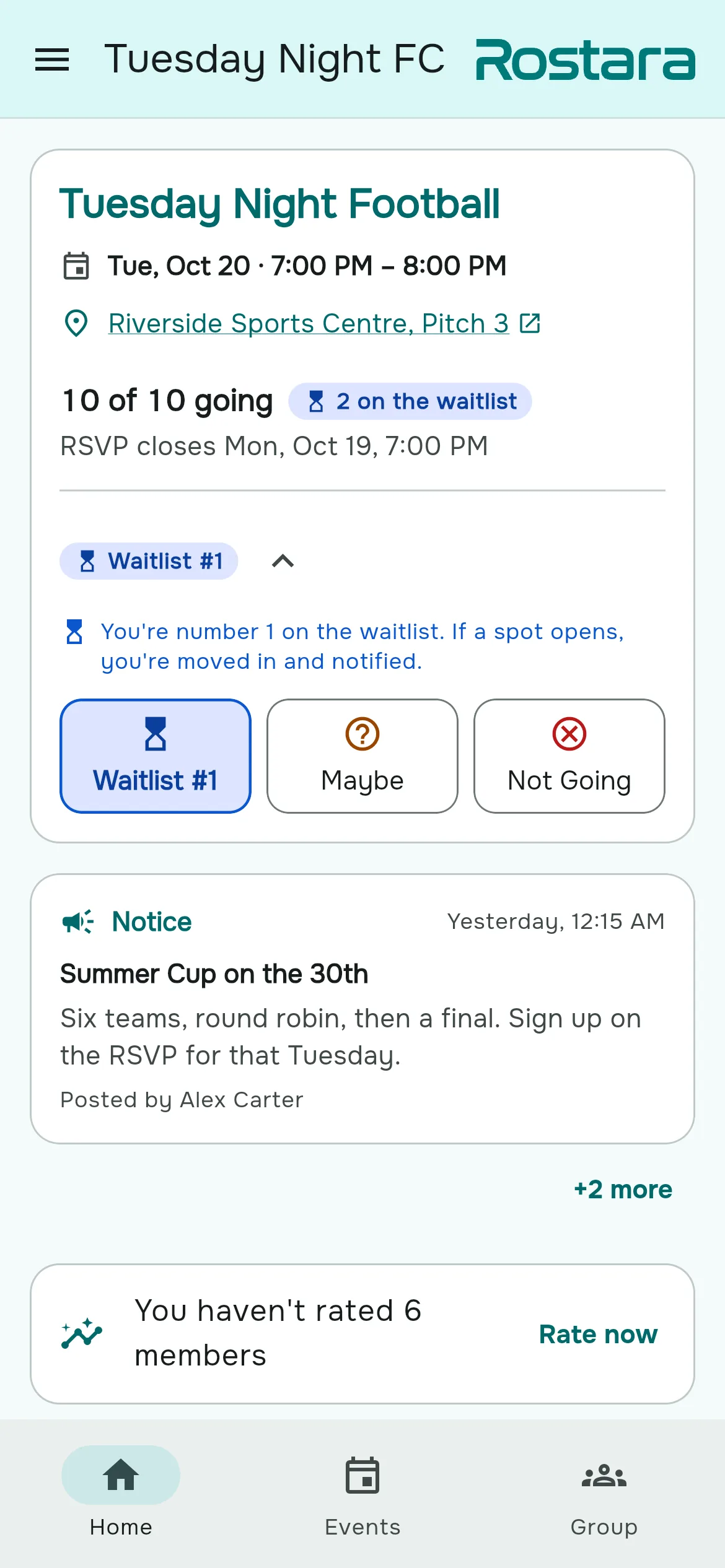
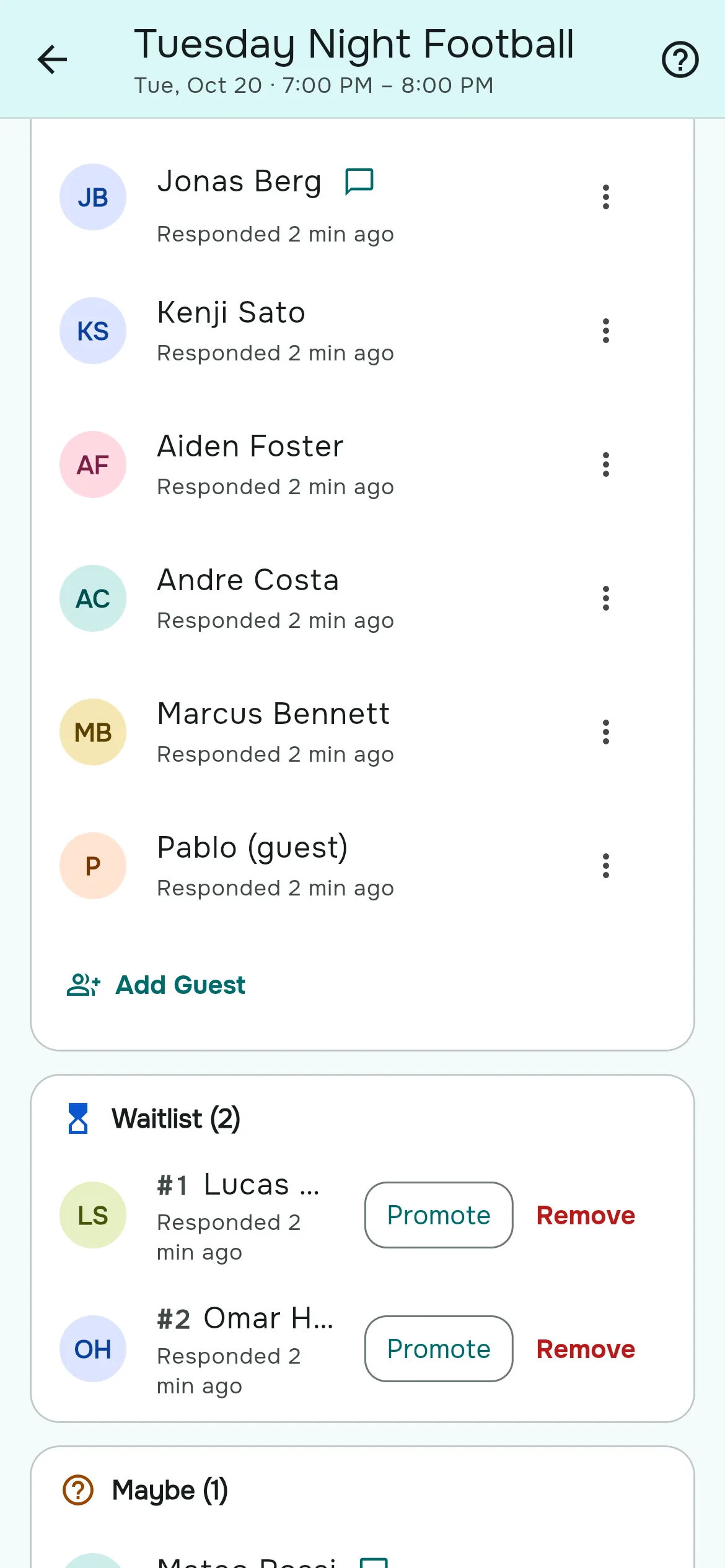
- First come, first served. The queue is ordered by when each person tapped Going. Members and guests share one queue.
- Players see their place. The Going button reads "Waitlist #2", with "You're number 2 on the waitlist. If a spot opens, you're moved in and notified."
- Promotion is automatic. When a Going player switches to Maybe or Not Going, is removed, or the cap grows, the first person waiting moves in straight away and gets a "You're in!" notification. If a guest is promoted, the member who added them is notified.
- Keeping your place. Tapping Going again or editing your note keeps your place. Switching to Maybe or Not Going and back puts you at the end.
- After the deadline, players can't drop out themselves. If an organizer removes someone from a live game, the next person on the waitlist is still promoted.
- Once a game is completed or cancelled, nobody is promoted and nobody is notified.
Squeezing one more in
On the RSVP page, an organizer can tap Promote on any waitlisted player, or set them to Going from the ⋮ menu. This works even when the game is full, so the headcount can read "11 of 10 going". Remove takes someone off the waitlist.
Guests
- Open the game's RSVP page (Details on the game) and scroll to the Going card.
- Tap Add Guest, type the guest's name and tap Add Guest.
- If the group uses ratings and team balancing, the dialog also asks you to rate the guest's skills so the balancer can place them fairly. Every skill starts at 5.
- A guest is added as Going and counts toward the limit. If the game is full, they join the waitlist in turn.
- Guests appear as "Name (guest)". They don't need the app and don't get notifications; the member who added them does.
- Each member can add up to 10 guests per game; organizers have no limit.
- Members can remove their own guests while RSVPs are open. Organizers can change or remove any guest at any time.
- Guests can only be added while RSVPs are open.
- Guests are included when the roster is synced from the RSVPs, so they are part of the team balance.
Policies you can copy
Paste one of these into a notice so everyone knows the rules before the first full game.
The standard weekly game
"RSVPs open Monday 9 am and close Wednesday 9 pm. The game is capped at 10. If it's full, tap Going anyway: you'll join the waitlist and be moved in automatically if someone drops out. Please don't drop out after the deadline; if you must, message the organizer."
Guests welcome, members first
"Guests are welcome but count toward the 10 spots. Add them under Add Guest before the deadline. If the game is full, your guest joins the waitlist like everyone else."
Final numbers the night before
"The list is final at 10 pm the night before. Waitlisted players: if you haven't been moved in by then, plan on not playing. Anyone moved in after 10 pm gets a call from the organizer."
When too many turn up
If more people arrive than the pitch can take, the usual answers are a third team with shorter games and winners staying on, or rotating a substitute every five minutes. Set the limit to what your space really holds and let the waitlist do the rest.
Questions people ask
How do I cap the number of players for a game?
Tick Limit attendance in the game form, add the number of players, and save. Anyone who answers Going after that joins the waitlist.
Who gets the next spot?
The person who has been waiting longest, by when they tapped Going. They are moved in automatically and notified.
Do guests count toward the cap?
Yes. Guests count like anyone else and share the same first-come queue.
Should waitlisted players turn up anyway?
That's your group's call. In Rostara they get a "You're in!" notification the moment a spot opens, so most groups ask waitlisted players to stay home unless they are moved in.
Can I allow 10 or 12 players depending on turnout?
Yes. Add both sizes. The game opens at 10 and grows to 12 once 12 people want in.
How many guests can I bring?
Up to 10 per game. Organizers have no limit.
Do guests need the app?
No. They are names on the RSVP. The member who added them gets the notifications.
Does the waitlist still move after the RSVP deadline?
Yes, when an organizer removes or changes a Going player on a live game. It stops once the game is completed or cancelled.
Is the waitlist a paid feature?
No. Player limits, the waitlist and guests are free.