In this guide
Most groups go through the same cycle: a few players start dropping out late, the organizer posts an annoyed message, it works for two weeks, and then it starts again. A written policy, applied the same way to everyone, ends the cycle. Rostara gives organizers the tools to apply it: warnings, suspensions from RSVPs, fines that land in the group's ledger, and an optional rule that suspends someone automatically after a number of warnings.
A no-show policy you can copy
Post it as a notice so every member sees it, and adjust the numbers to your group:
"RSVPs close 24 hours before kick-off. After that, dropping out counts as a late cancellation; not turning up counts as a no-show. A no-show or late cancellation gets a warning. A no-show also pays their share of the pitch. Three active warnings mean a two-week suspension from RSVPs. Warnings expire after two months. Injuries and emergencies don't count, just message the organizer."
What counts as a late cancellation?
Groups use anything from 2 to 24 hours before the start. The common sense rule: late is when you can no longer reasonably fill the spot. In Rostara, the RSVP deadline draws that line for you. Once RSVPs close, players can't change or withdraw their answer in the app; only organizers can. Set the deadline to match your policy, and anyone who has to drop out after it has to talk to you.
The tools
| Tool | What it does |
|---|---|
| Warning | A recorded notice the player sees on their Home screen, with your message. It can expire, and it can carry actions. |
| Suspension | Until the end date, the player can't RSVP or add guests. They are removed from upcoming games, and their spots go to the waitlist. |
| Fine | An amount posted to the group's ledger: the player's balance goes down and the pot goes up. |
| Auto-waitlist | The player's "Going" lands on the waitlist and is never promoted automatically; only an organizer can move them in. A softer step than a suspension. |
| No guests | The player can't add guests. |
| Block team voting | The player can't suggest or vote on teams. |
| Notify other admins | The group's other organizers get a notification about it. |
Warnings and suspensions are visible only to the organizers and to the player concerned. Fines show as a ledger line ("Disciplinary fine"), because they move money into the pot.
Warn a player
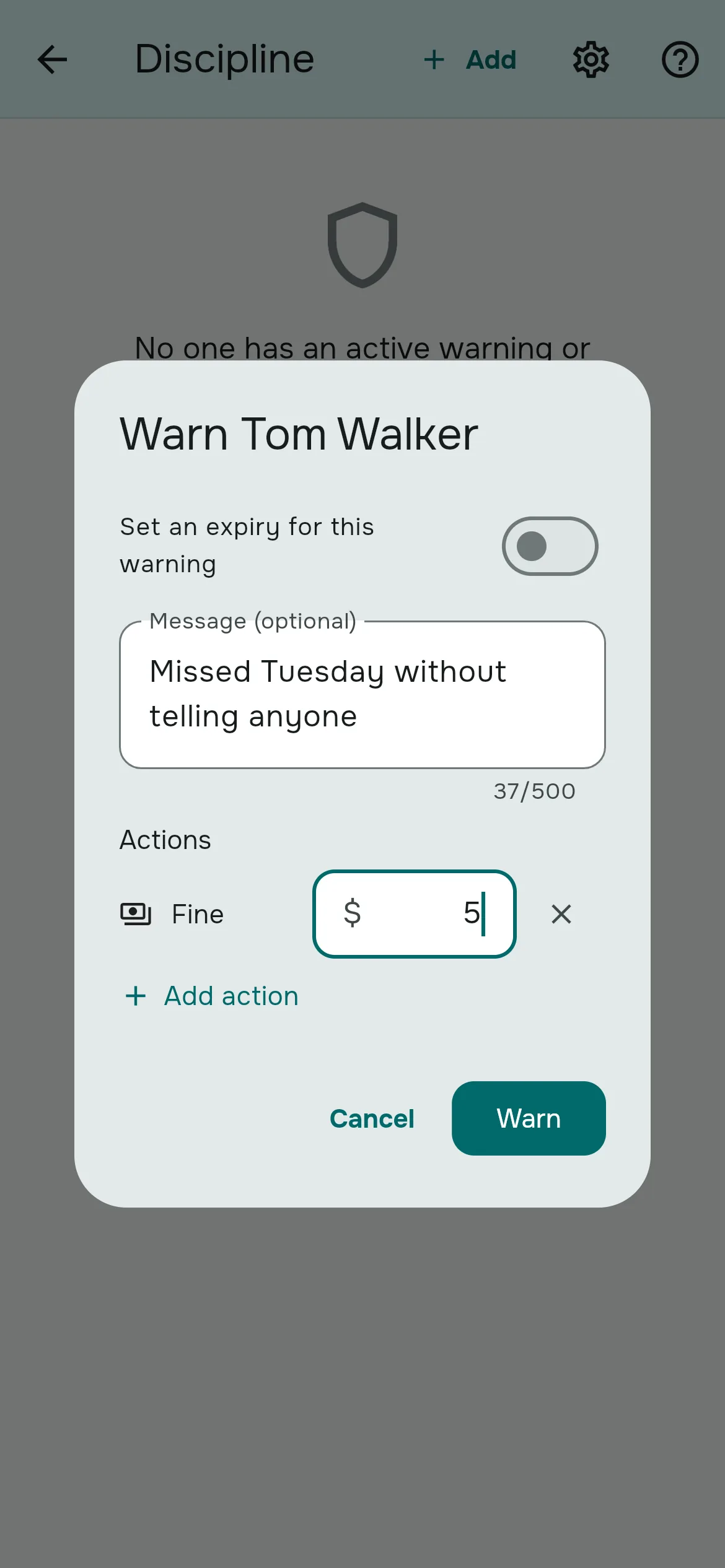
- Go to Group → Members, tap ⋮ on the player's row and choose Issue warning. Or open Group → Discipline → Add.
- Optionally switch on Set an expiry for this warning so it lapses after a set time.
- Write a short message, for example "Missed Thursday's game without letting anyone know".
- Under Actions, tap Add action to attach a fine, auto-waitlist or any of the others.
- Tap Warn. The player gets a notification and a card on their Home screen.
Suspend a player
- Members → ⋮ → Suspend member.
- Pick the Suspension length: from one day to six months, a custom length, or an end date.
- Add a message and any actions, then tap Suspend.
The player is taken off every upcoming game straight away, and the waitlist fills their spots. Guests they added stay. When the suspension ends they can RSVP again, and they get a "Your suspension has ended" notification.
Make it automatic
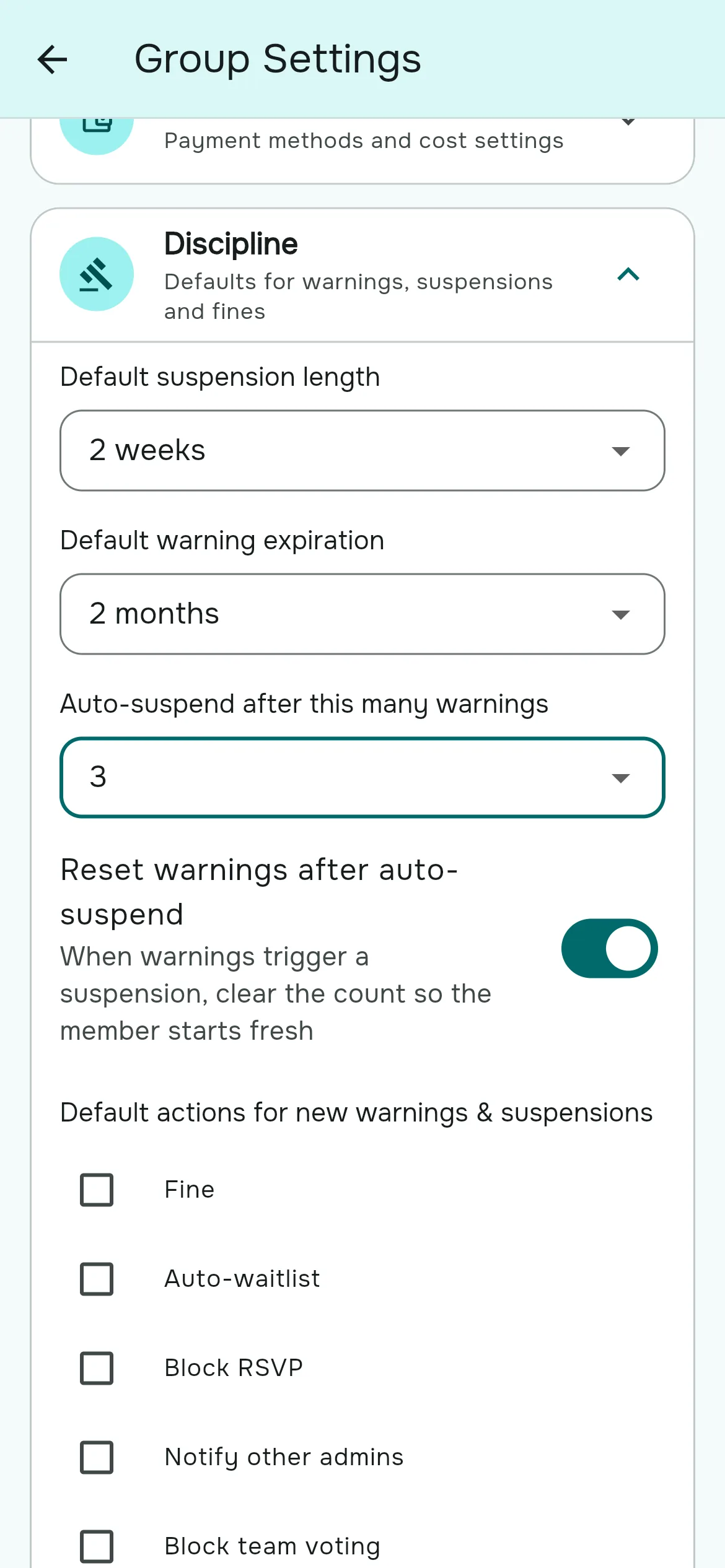
In Group Settings → Discipline, organizers can set the policy once:
- Auto-suspend after this many warnings: from 2 to 10, or Off. When a player reaches it, they are suspended automatically.
- Default suspension length and Default warning expiration, which pre-fill the dialogs and set the length of automatic suspensions.
- Reset warnings after auto-suspend, so a player starts fresh once they have served a suspension.
- Default actions, including a default fine amount.
Lift or clear early
People have bad weeks. From the Members ⋮ menu or the player's discipline record, choose Lift suspension or Clear warnings. If the record carried a fine, you can choose to void it, which refunds it in the ledger. Lifting doesn't put the player back into games they were removed from.
What the player sees
- A card at the top of Home that can't be dismissed: "You're suspended" with the end date, or "You have a warning", your message, and any fine.
- On the RSVP card: "You're suspended and can't RSVP right now".
- Their own discipline record on the Discipline tile, with each warning's status: Active, Expired, Escalated or Lifted.
A player who leaves the group while suspended can't rejoin with the invite code until the suspension ends or is lifted.
Being fair about it
- Apply it to everyone, including your friends. The policy only works if it's predictable.
- Use the softer steps first. A warning with auto-waitlist often works better than a suspension: the player can still come, just after everyone else.
- Write the reason. The message is what the player sees; a calm, factual note avoids most arguments.
- Excuse real emergencies. Clear the warning, and say so.
Questions organizers ask
What is a fair no-show policy?
One warning per no-show or late cancellation, a suspension after a set number of warnings, and warnings that expire after a while. Write it down, post it, and apply it to everyone.
Does Rostara detect no-shows automatically?
No. There's no check-in, so an organizer issues warnings by hand. The RSVP deadline marks the point after which dropping out is late.
Can I fine a player?
Yes. Add a Fine action to a warning or suspension. It goes onto their balance in the group's ledger and into the pot.
Should no-shows pay their share of the pitch?
Many groups say yes, because the pitch is paid for either way. Include them in that game's charge, or add a fine.
How do I suspend someone automatically after three warnings?
In Group Settings → Discipline, set Auto-suspend after this many warnings to 3 and choose a default suspension length.
Can other members see who has been warned?
No. Only organizers and the player see warnings and suspensions. A fine does appear as a ledger line.
Can a suspended player leave and rejoin to reset it?
No. They can't rejoin with the invite code until the suspension ends or is lifted.
Can I suspend another admin?
No. Organizers can only discipline regular members. Change their role first.
Will the player know?
Yes. They get a notification (they can turn that category off) and a card on their Home screen that they can't dismiss.