In this guide
Rostara's bookkeeping is a shared record of who owes what. It never takes payments or moves money: players still pay by cash, bank transfer, Venmo, PayPal or whatever your group uses. What Rostara adds is a ledger everyone trusts, with each player's balance on their Home screen and an organizer view of the whole group.
A worked example
Alex books a pitch for €60 and pays for it. Ten people play. In Rostara the organizer adds one charge: "A member paid", paid by Alex, €60, split equally among the ten. Each player's balance goes down by €6, and Alex's goes up by €54: €60 for the pitch, less his own €6 share. As players pay Alex back and record it, their balances return to zero, and Alex's comes down with each payment until he is settled too.
The group pot and member balances
The ledger tracks two separate things:
- The group pot: the group's kitty, for example money collected up front, a sponsor's donation or fines. It pays for shared things like balls, bibs or a pitch booked from the kitty.
- Member balances: what each member owes the group (shown as "Owes" or "You owe") or what the group owes them ("In credit").
The pot is not the sum of the balances. Paying a pitch from the pot charges nobody; a member fronting the cost creates balances between players.
Add a charge
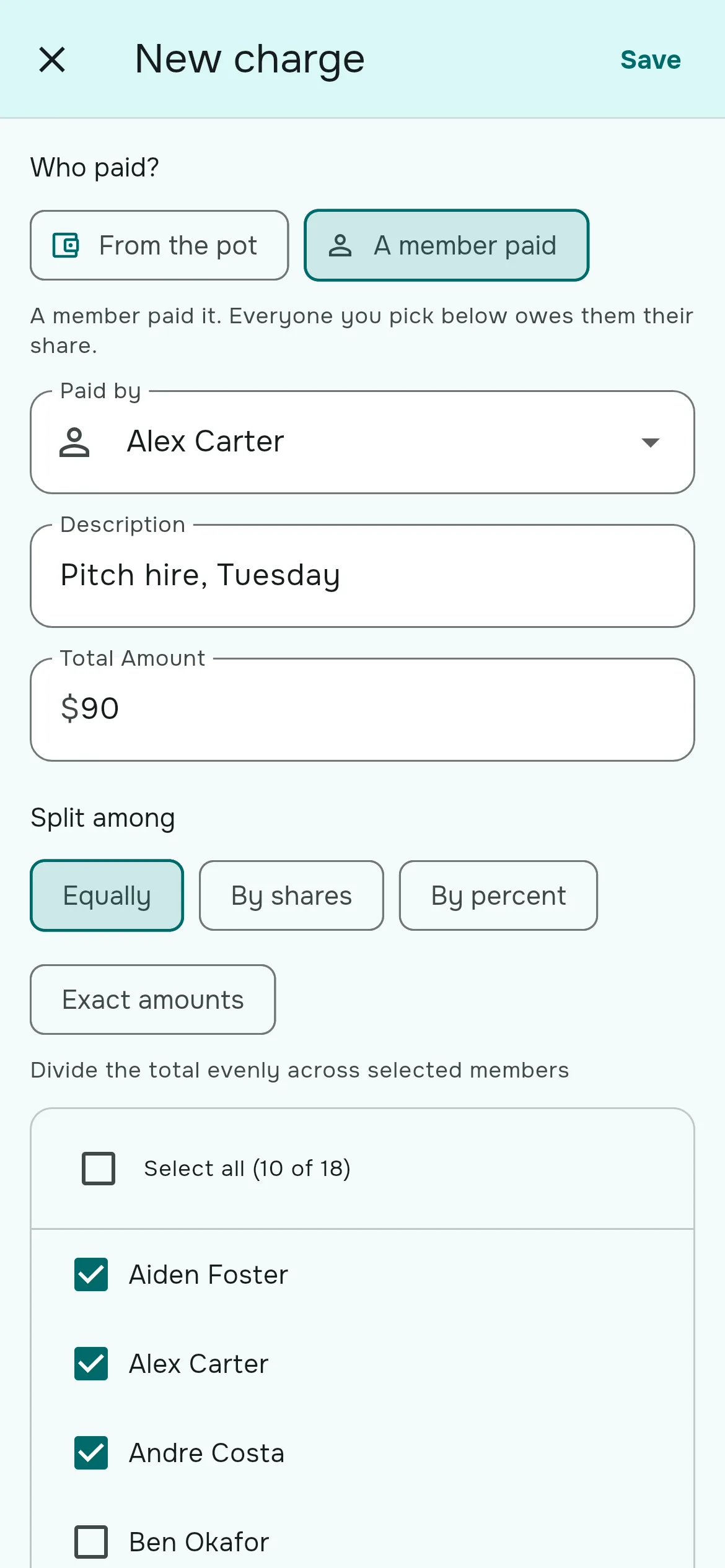
- Go to Group → Bookkeeping and tap Add Entry, then Add Charge.
- Under Who paid?, choose From the pot (the kitty paid, nobody is charged) or A member paid (that member fronted it and everyone in the split owes them).
- For a member payment, pick who paid in Paid by.
- Enter a Description ("Pitch hire, Thursday") and the Total Amount. If you set a default game cost, it is filled in for you.
- Under Split among, choose how to divide it and tick the players, or use Select all.
- Tap Save. The charge counts straight away.
Four ways to split
| Mode | Use it when |
|---|---|
| Equally | Everyone pays the same share. The usual choice. |
| By shares | Someone counts double, for example a player who brought a guest gets 2 shares. |
| By percent | Fixed percentages that add up to 100. |
| Exact amounts | You type each person's amount, and they must add up to the total. |
A live summary shows the result, such as "€6.00 per person", and leftover cents are spread fairly across the group rather than always landing on the same person.
Record payments
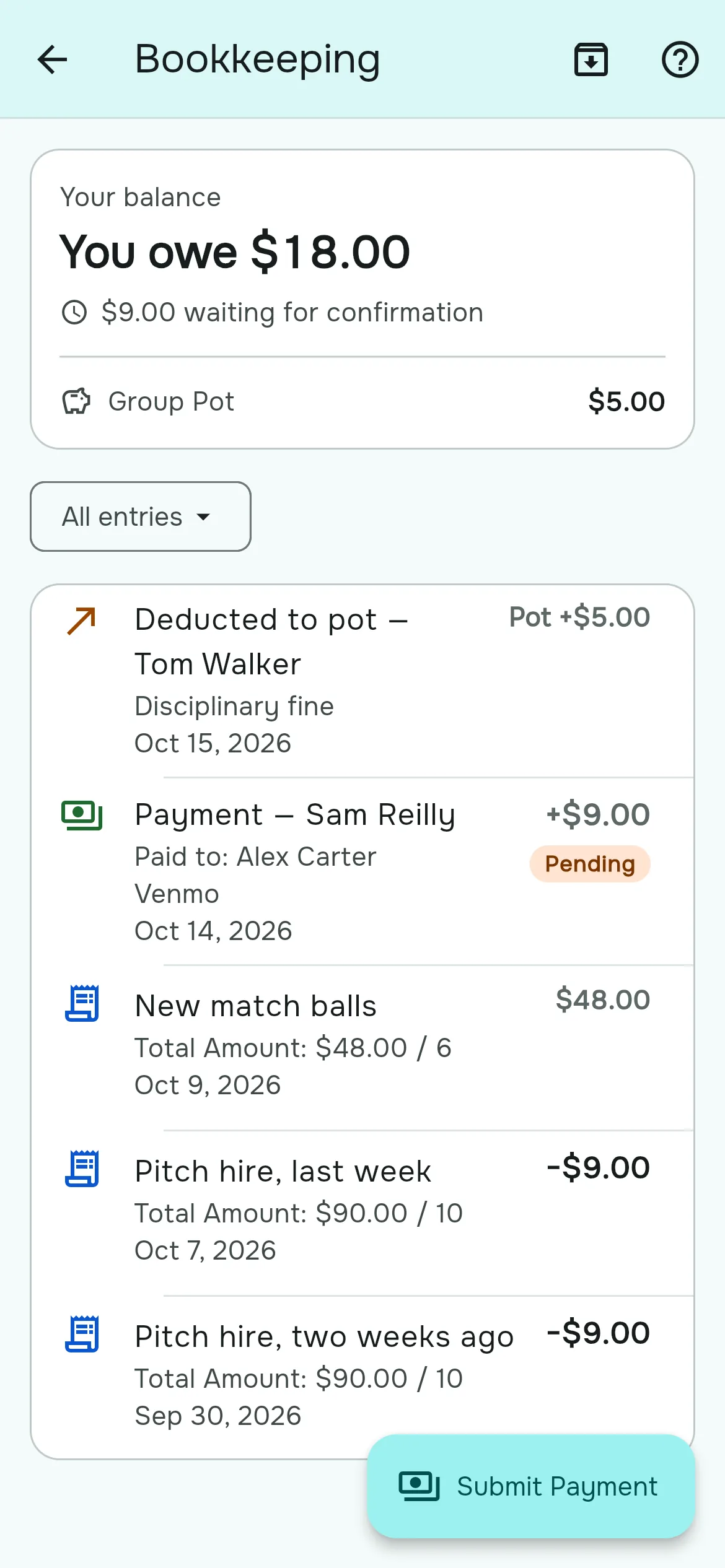
A player says they've paid
- The player opens Bookkeeping and taps Submit Payment, or Record Payment on the "You owe" card on Home.
- If the group listed its payment methods, they can tap one under "Pay via" to open your Venmo, PayPal or Cash App page, or copy a Zelle or bank handle.
- They choose who they paid in Paid to (usually the treasurer), enter the amount and submit.
- The payment shows as Pending until an organizer approves it. Then their balance updates and they get a "Payment approved" notification.
Approve or decline
Organizers filter the Activity list by Status → Pending, tap a payment and choose Approve or Decline. A declined payment can be fixed and resubmitted by the player.
Record a payment yourself
If someone hands you cash, use Add Entry → Record Payment, choose the member and who received it, and save. It counts immediately.
The treasurer
Set a Treasurer in Group Settings → Bookkeeping: the person who holds the group's money. Payments default to them, and when they collect cash for the group their balance shows as "Holding €40 for the group" rather than a debt. They aren't sent "you owe" reminders for money they are simply holding.
Adjustments for real life
| Entry | What it's for |
|---|---|
| Add to pot | Seed the kitty with cash that didn't come from a member: an opening balance, a sponsor, a refund. |
| Deduct from credit | Move money from a member's credit into the pot, for example season dues taken from prepaid credit. |
| Cash out a member | Pay out someone's credit when they leave the group. |
| Record opening balance | Bring an existing debt over from a spreadsheet when you start using Rostara. |
Close the books each season
- Add Entry → Close period.
- Pick the cutoff date. The preview shows how many entries will be archived and the balances and pot that carry forward.
- Confirm. Approved entries up to the cutoff are archived and replaced with one closing balance per member, plus the pot. Pending entries stay open. This can't be undone.
Archived entries are hidden until you tap Show archived, so the Activity list stays focused on the current season.
Export to a spreadsheet
Organizers tap the download icon (Export to CSV) for a file with every entry, its effect on the pot and on each member, and a totals row, ready for Excel or Google Sheets.
Settings
- Currency: any ISO currency, one per group. Changing it only relabels amounts; nothing is converted.
- Default game cost: fills in the total on new charges.
- Payment methods: Venmo, PayPal, Cash App, Zelle, bank transfer or other, shown to players when they record a payment.
Tips for a group that pays on time
- Charge right after the game. One charge per game, split among the players who came, while everyone remembers it.
- Agree a late-cancellation rule. Many groups charge players who drop out after the deadline, because the pitch is paid either way. See no-shows and late cancellations.
- Prepay to cut admin. Some groups collect a month up front and record it as a payment: players start in credit and each game's charge is taken from it.
Questions people ask
How do I split pitch fees between players?
Add a charge with "A member paid", choose who paid, enter the total and split it equally among the players who came. Each player's balance drops by their share.
Does Rostara take payments?
No. It records who owes what. Players pay the way your group already does, then record the payment for an organizer to approve.
How much should I charge per player?
Divide the pitch or court cost by the number of players who came. For a €60 pitch and ten players, that's €6 each. Rostara spreads leftover cents fairly when it doesn't divide evenly.
Can one player pay double because they brought a guest?
Yes. Use By shares and give them 2 shares, or set exact amounts.
What's the difference between the pot and balances?
The pot is the group's kitty. Balances are between each member and the group. A pitch paid from the pot charges nobody.
Will I be told when someone submits a payment?
No notification is sent to organizers. Open Bookkeeping and filter by Pending to see payments waiting for approval.
Can other players see what I owe?
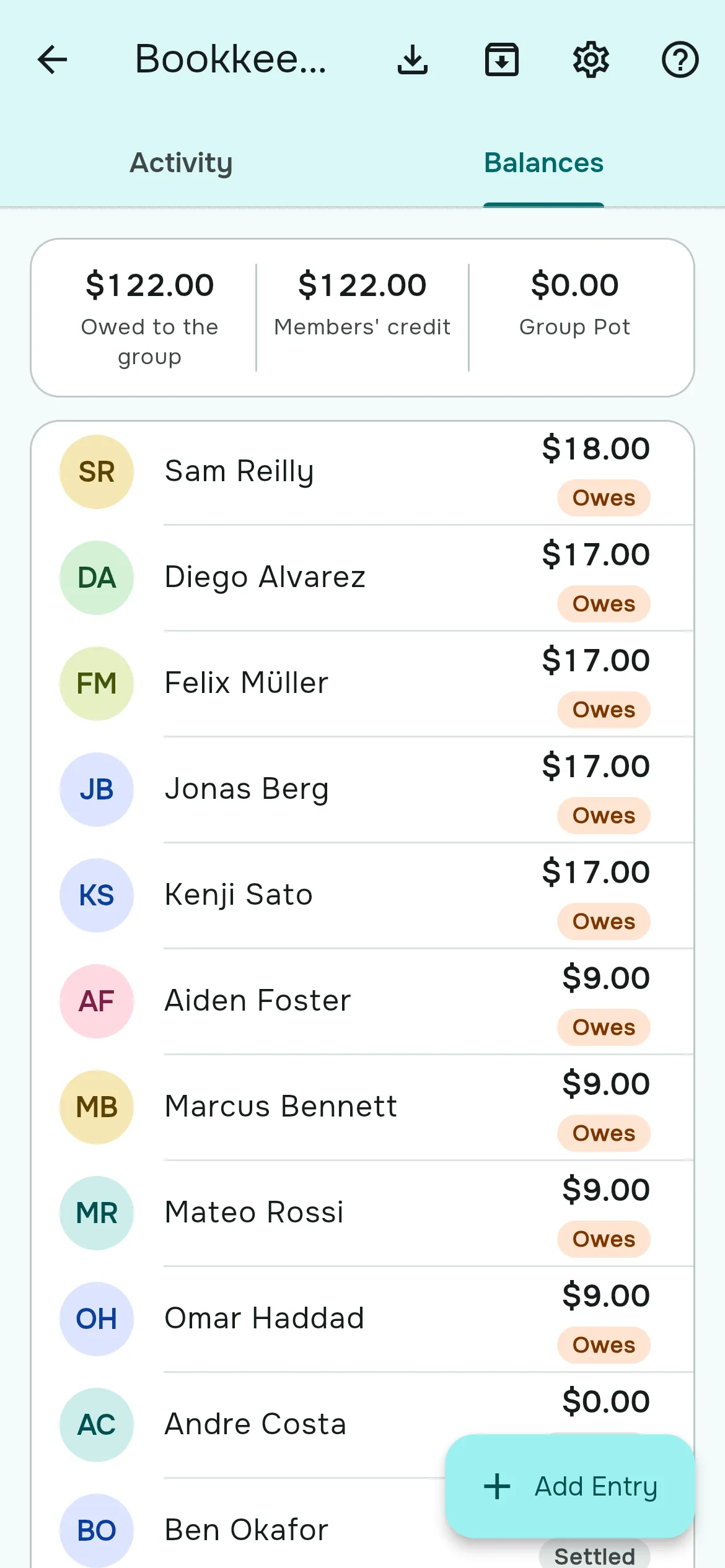
The app shows each player their own balance. Organizers see everyone's on the Balances tab.
How do I bring in old debts from a spreadsheet?
Use Record opening balance for each debt, Record Payment for prepaid credit, and Add to pot for cash on hand.
Can I export the ledger?
Yes. Organizers can export every entry to a CSV file that opens in Excel or Google Sheets.