In this guide
- Four ways to pick teams, honestly compared
- A worked example with ten players
- Before you balance: ratings and a roster
- Step 1: pick who is playing
- Step 2: auto-balance
- Step 3: read the balance score
- Step 4: adjust by hand
- Step 5: publish the teams
- Three or more teams, and odd numbers
- Goalkeepers
- If you don't want teams at all
- Who can do what
- Questions organizers ask
Every regular game has the same five minutes before kick-off: two captains, a lot of pointing, and the same friends ending up together. Sometimes it works. Often the first goal decides the evening. Rostara replaces that with a balancer that looks at everyone's skill ratings and finds the split where the teams are as close as possible, then lets you adjust it by hand before you publish it to the group.
Four ways to pick teams, honestly compared
| Method | How it works | Where it goes wrong |
|---|---|---|
| Captains pick | Two players take turns choosing. | The captains are usually the best two players, the last picked feel it every week, and friends pick friends. |
| Random draw | Bibs out of a bag, or a random team generator. | Fair in the long run, unfair tonight. One bad draw stacks a team. |
| Snake draft | Rank everyone, then pick 1-2-2-1-1-2… so the second team gets two picks after the first. | Better, but only as good as the ranking in someone's head, and it ignores what kind of player each person is. |
| Rating-balanced | Everyone is rated on a few skills; a computer checks the possible splits and picks the closest. | Needs ratings first. Rostara handles that with private group ratings and fills gaps with sensible defaults. |
The balancer is the fourth option, with the first three still available: you can drag players around by hand, or let members suggest their own teams and vote on them.
A worked example with ten players
Say ten people are coming to a five-a-side game, and their overall ratings in the group are:
| Player | Rating | Player | Rating |
|---|---|---|---|
| Ana | 8.2 | Felix | 6.2 |
| Ben | 7.6 | Gio | 5.9 |
| Carla | 7.1 | Hana | 5.4 |
| Dev | 6.8 | Ivo | 5.0 |
| Emma | 6.5 | Jon | 4.3 |
A snake draft with Ana's team picking first gives Ana, Dev, Emma, Hana and Ivo (average 6.38) against Ben, Carla, Felix, Gio and Jon (average 6.22). Not bad: a gap of 0.16. Checking all 126 possible five-a-side splits finds one where both teams average exactly 6.30, Ana, Carla, Emma, Hana and Jon against Ben, Dev, Felix, Gio and Ivo, plus several more within 0.04. The exact split isn't one a captain would think of: it puts the best player with the weakest. Among the closest splits, the balancer then prefers the ones whose teams also match skill by skill.
Real groups are more interesting than one number per player, which is why Rostara rates several skills and also compares the shape of each team. That is explained below.
Before you balance: ratings and a roster
The balancer needs two things.
- Ratings. Players are rated from 1 to 10 on a handful of skills for your sport, and everyone sees only the averages. See how to rate players privately. Anyone not rated yet counts as the average of the other players on the roster for that skill, or 5 if nobody is rated on it, so new players never drag a team down to zero.
- A roster: who is actually playing. Organizers set it on the game page with Manage Roster, or sync it from the people who answered Going to the RSVP.
Step 1: pick who is playing
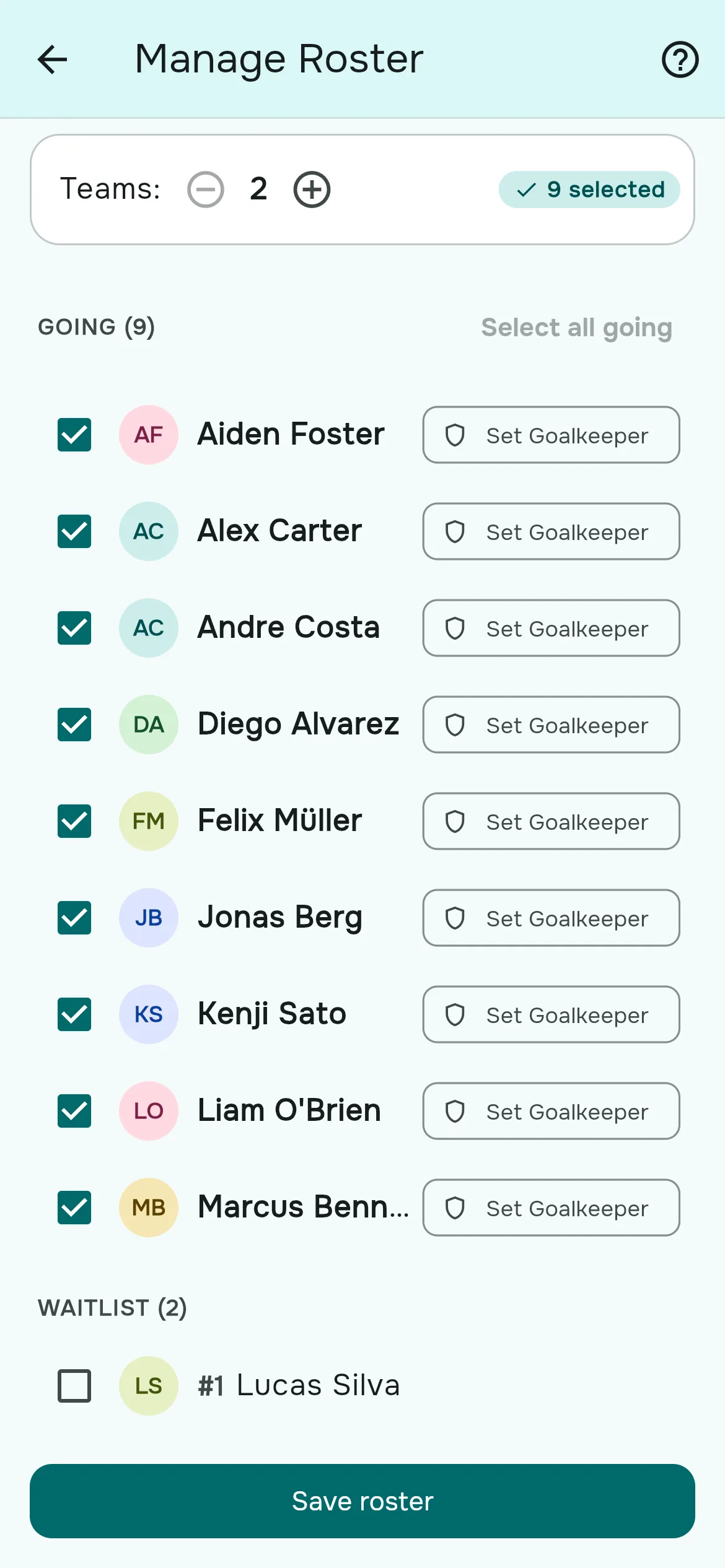
- Open the game on the Events tab. In the Teams section, tap Manage Roster.
- Members are grouped by their answer: Going, Waitlist, Maybe, No Response and Not going. Tick the players, or tap Select all going.
- Set the number of teams with the minus and plus buttons next to Teams:. The default is two; Auto Balance makes up to eight.
- Tap Save roster.
Guests who were added to the RSVP come in through a sync: on the RSVP page, organizers tap Sync to Roster to build the roster from everyone answering Going, members and guests together. You can also tick Auto-sync roster when RSVP closes on the game so the roster is built automatically at the RSVP deadline.
Step 2: auto-balance
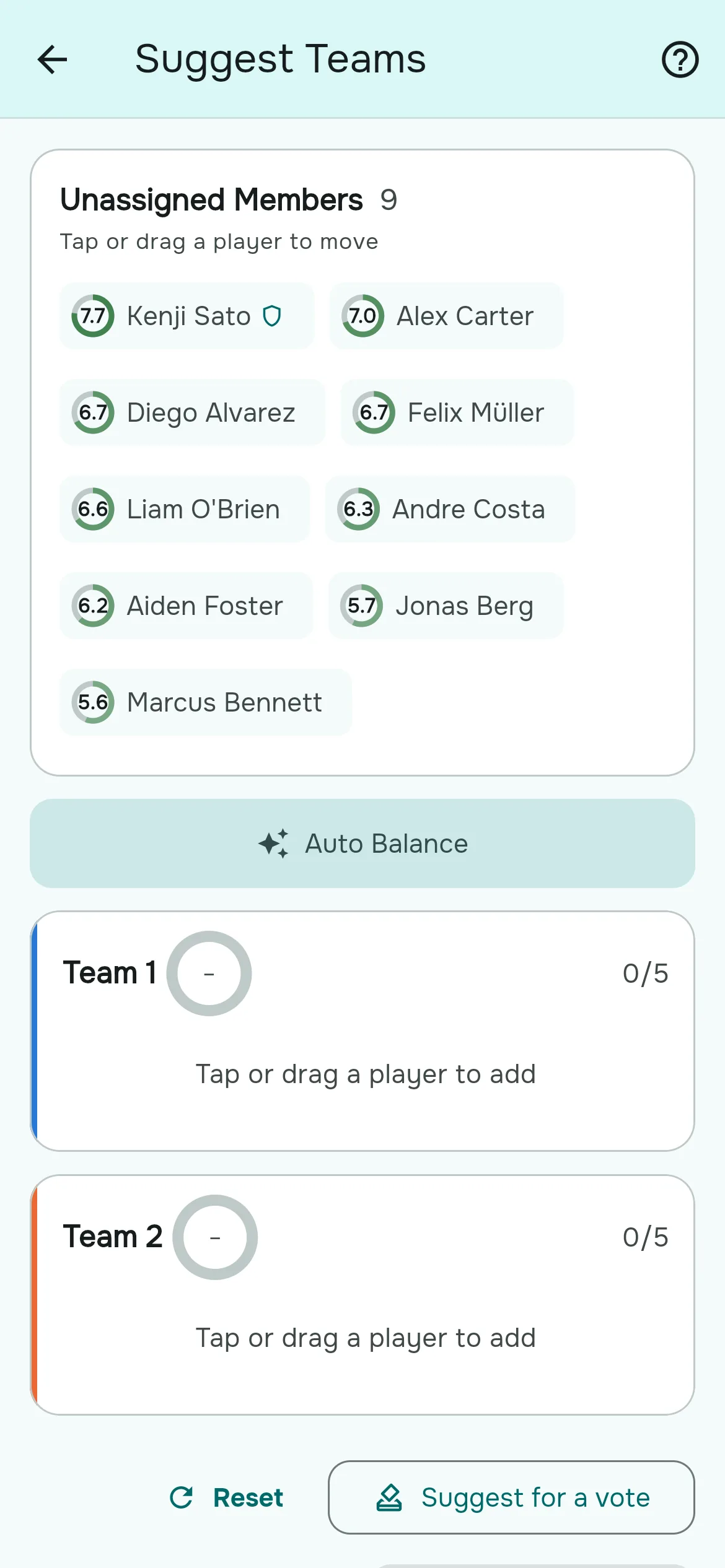
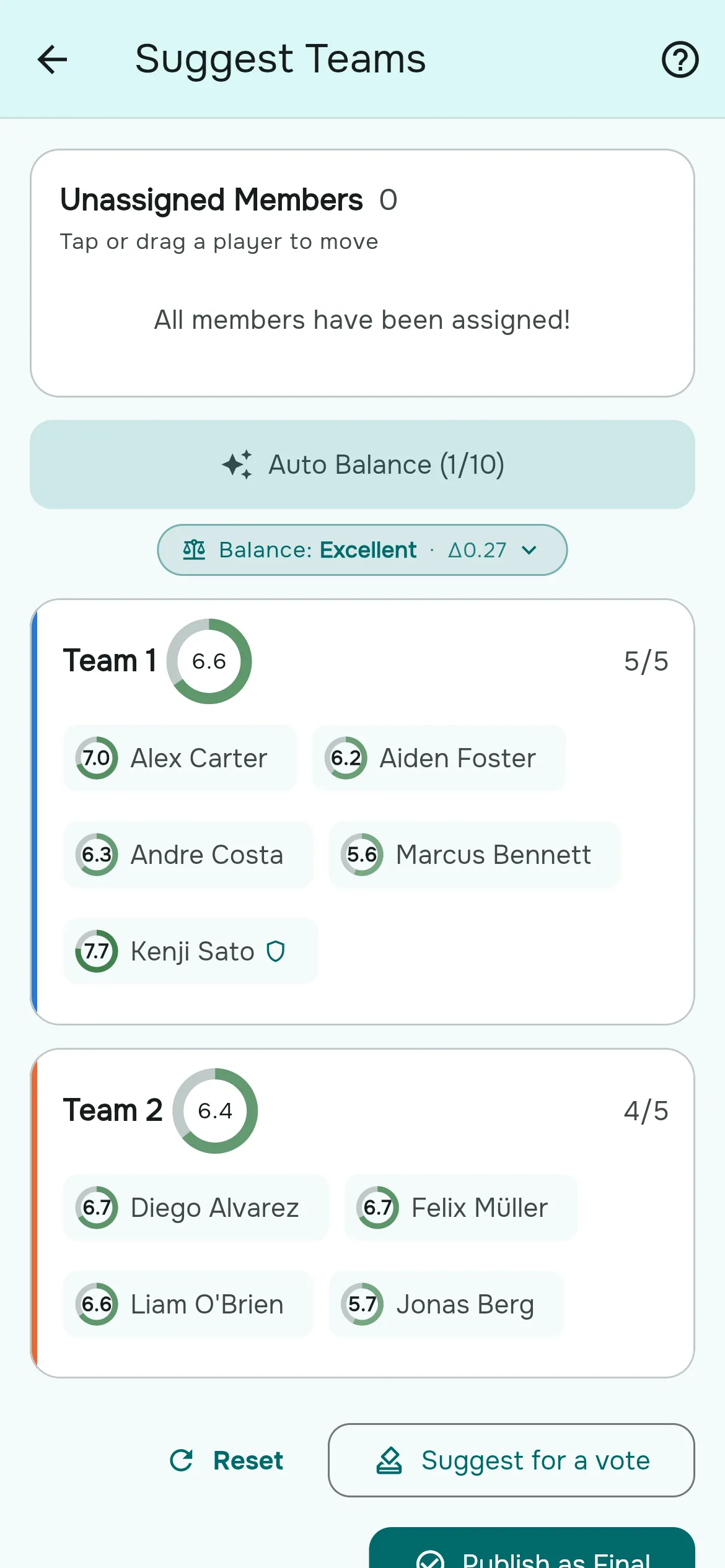
- Tap Suggest Teams on the game page (it is also on the Home tab once RSVPs close).
- Tap Auto Balance. The teams fill in, each with its average rating, and a pill appears, for example Balance: Excellent · Δ0.18.
- Not happy with it? Tap Auto Balance again. You get up to ten of the best splits, best first, and the button counts through them: "Auto Balance (2/10)".
Step 3: read the balance score
Δ (delta) is roughly the rating-point gap between the two most different teams. The smaller, the closer the game:
| Grade | Δ | What it means on the pitch |
|---|---|---|
| Excellent | below 0.30 | Nobody can tell which team is stronger before kick-off. |
| Good | 0.30 to 0.49 | Close; small differences that one good half can swing. |
| Fair | 0.50 to 0.74 | Playable, but one side has an edge. Worth a manual swap. |
| Uneven | 0.75 or more | Expect a one-sided game. Try another option or move a player. |
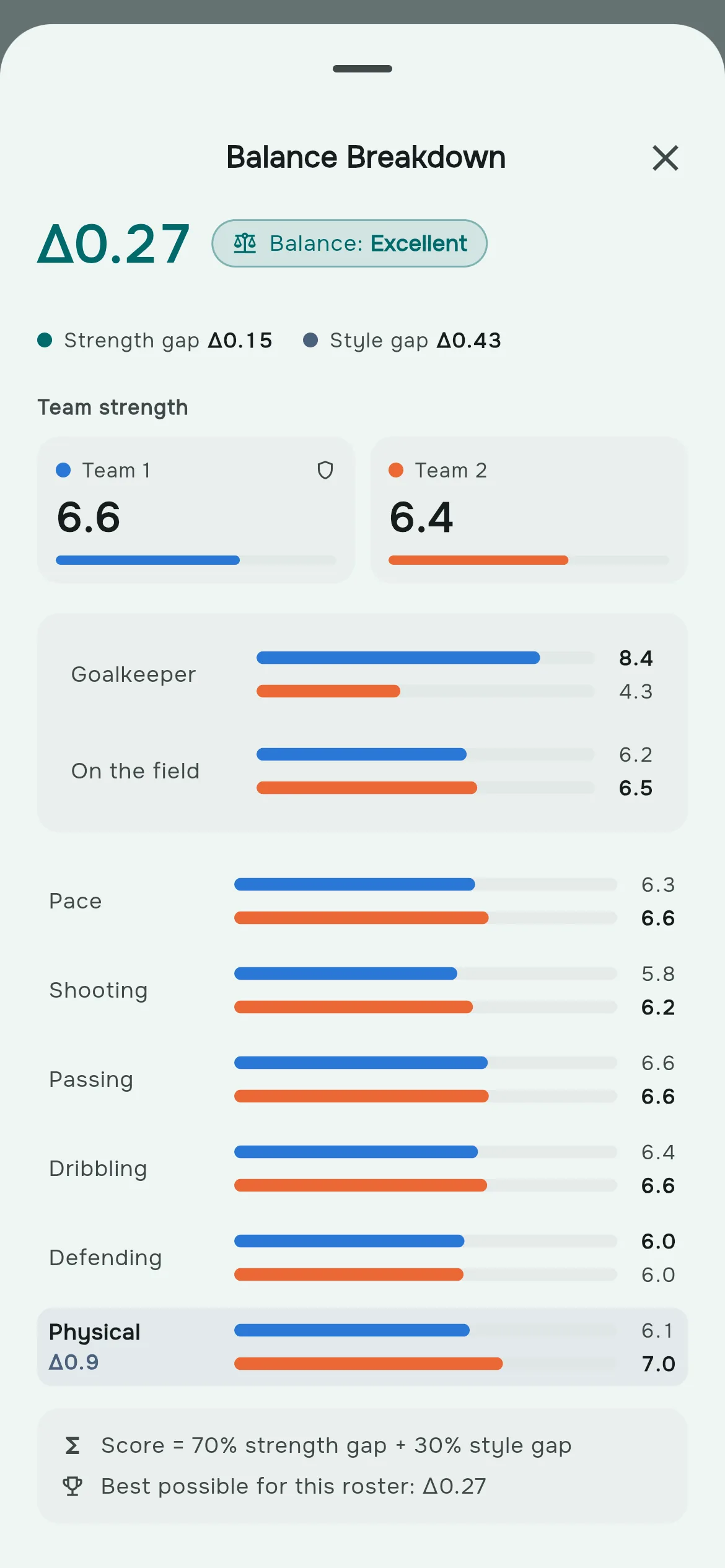
Tap the pill to open the Balance Breakdown. It shows each team's strength on a 0 to 10 bar, the gap for every skill with the widest one highlighted, and how much of the score comes from the strength gap and how much from the style gap. With three or more teams it names the widest pair, for example "Team 1 ↔ Team 3".
Strength gap and style gap
Two teams can have the same average and still play very differently: one full of fast attackers, the other of solid defenders. Rostara scores both:
- Strength gap: the difference in overall team rating, using your group's skill weights.
- Style gap: how different the teams are skill by skill.
By default the score is 70% strength and 30% style. An organizer can change that with Balance priority in Group Settings → Skills, anywhere from 30% to 100%. At 100%, fair means equal overall strength only, so a weaker goalkeeper can be offset by a stronger outfield.
The footnote tells you how sure it is. "Best possible for this roster" means every split was checked, which happens for up to 22 players in two teams, 15 in three or 13 in four. With bigger groups it samples tens of thousands of splits and improves them, and says "Best found for this roster".
Step 4: adjust by hand
You know things the ratings don't: two brothers who shouldn't be on the same team, someone carrying a knock. Move players yourself:
- Drag a player to another team, or back to Unassigned Members.
- Or tap a player and choose the team from the menu.
The balance pill updates live with every move, so you can see what your swap costs. Tap Reset to put everyone back and start again.
Step 5: publish the teams
- When nobody is left unassigned, tap Publish as Final.
- Add an optional note for everyone ("Meet at Field 3") and a note per team ("Blue bibs").
- Tap Publish. Players who answered Going get a push, "Teams are out", and the game page and Home tab show the published teams with "You're on Team 2" for each player.
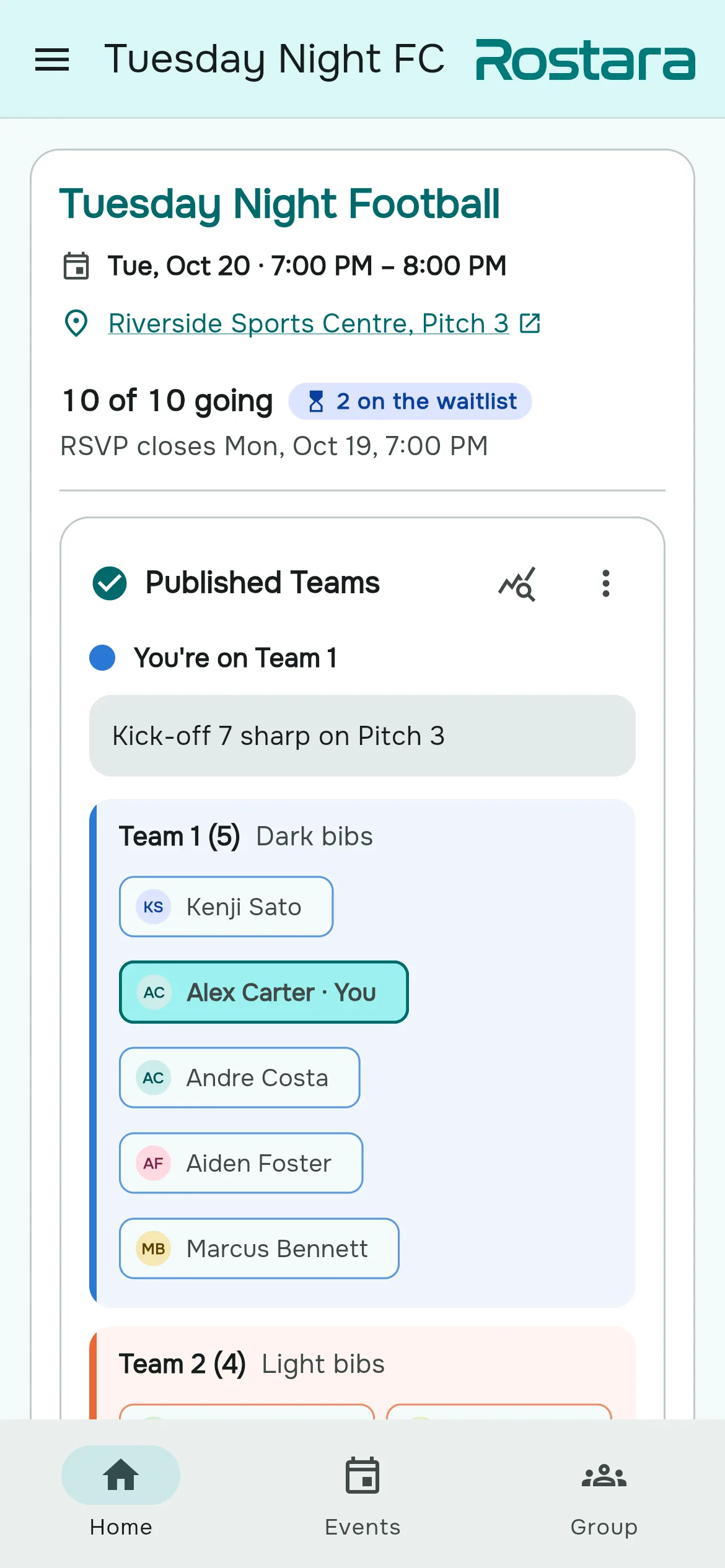
Need to change them? Open the published card's menu, choose Unpublish Teams, adjust and publish again. Players are notified again when you republish.
Three or more teams, and odd numbers
- Set the number of teams on Manage Roster. Auto Balance makes between 2 and 8 teams from 2 to 64 players.
- Team sizes differ by at most one: 17 players in three teams become 6, 6 and 5. Team strength is an average, so the team with the extra player isn't treated as stronger just for being bigger.
- With three or more teams, the score is the gap between the two most different teams, so every pairing is close.
Goalkeepers
In soccer, futsal, handball and hockey, a great keeper changes everything. Rostara rates goalkeeping separately, knows how much of each game every player spends in goal, and can spread designated keepers across the teams. It has its own guide: how to balance goalkeepers across teams.
If you don't want teams at all
Some groups just need a list of who is playing. Set the game's Team Balancing to Off in the event form. Organizers then see only Manage Roster and publish the list with Publish Roster.
Who can do what
- Organizers (the group's owner and admins) pick the roster, balance, publish and unpublish.
- Members can open Suggest Teams and Auto Balance when the game's Team Balancing is set to Everyone, and suggest their split for a vote. See team voting.
Questions organizers ask
How does the balancer decide the teams?
It compares every possible split (or samples tens of thousands for big groups) and scores each one on the gap in overall team strength and, by default with 30% of the weight, how different the teams are skill by skill. It keeps the ten splits whose two most different teams are closest.
What do Excellent, Good, Fair and Uneven mean?
They grade Δ, roughly the rating-point gap between the two most different teams: Excellent below 0.30, Good below 0.50, Fair below 0.75, and Uneven at 0.75 or more.
Why do I get different teams when I tap Auto Balance again?
Each tap shows the next of up to ten balanced splits, best first. The counter on the button shows which one you are looking at.
How many teams can it make?
From 2 to 8 teams with up to 64 players. Set the number on the Manage Roster screen.
What happens with players nobody has rated?
They count as the average of the other players on the roster for each skill they haven't been rated on, or 5 out of 10 if nobody has been rated on it. They are never counted as zero.
Do guests count in the balance?
Yes. When a guest is added to an RSVP, the person adding them can rate their skills, and those values are used for that game. Guests reach the roster through Sync to Roster or the automatic sync.
Can I keep two friends on different teams?
Yes. Put them on different teams before tapping Auto Balance. Players you placed stay where you put them and everyone else is balanced around them.
Can players make the teams themselves?
If the game's Team Balancing is set to Everyone, members can open Suggest Teams, build a split and submit it for the group to vote on. Letting members do this is part of Rostara Pro.
Does it use past results or who won last week?
No. It uses the group's skill ratings, the skill weights and goalkeeper roles. It does not look at results, positions or history.
Is the team balancer free?
Yes. Auto Balance, the balance breakdown, manual adjustments and publishing are free. Member suggestions and voting, and custom skill lists, are Rostara Pro.