In this guide
Most groups already rate each other, in their heads. The problem is that one person's ranking decides everything and nobody can say so out loud. Rostara lets the whole group (or just the organizers) rate players on a few skills. Every individual score stays private to the person who gave it; everyone sees only the averages, and those averages drive the team balancer.
Who sees what
| The rater | The player rated | Other members | Admins and owner | |
|---|---|---|---|---|
| Individual scores | Their own only | No | No | No |
| Group average per skill | Yes | Yes | Yes | Yes |
| Overall rating | Yes | Yes | Yes | Yes |
Nobody, including the group's owner, can see who gave which score. The rating dialog says it in plain words: "Your scores are private. Teammates only see an average." That is what keeps ratings honest: nobody has to rate a friend higher to avoid an awkward conversation.
The averages are visible to anyone who can open the Ratings page, which depends on the group's Ratings Access setting (below).
A rating scale your group can agree on
Rostara uses whole numbers from 1 to 10 on each skill, and every skill starts at 5 the first time you rate someone. Ratings only work if people mean the same thing by "7", so share a scale like this with your group, for example in a notice:
| Score | What it means in a pickup game |
|---|---|
| 1 to 2 | New to the sport. Still learning the basics of this skill. |
| 3 to 4 | Below the group's usual level. Gets by, but it shows. |
| 5 | A solid regular. The middle of your group, not the middle of all players everywhere. |
| 6 to 7 | Clearly above the group's average at this skill. |
| 8 to 9 | One of the best in the group. You'd pick them first for it. |
| 10 | Plays at a level well above your group. Rare. |
Two habits make ratings better quickly:
- Calibrate on three players. Agree on one weaker, one middle and one stronger regular as reference points, then rate everyone else relative to them.
- Rate the skill, not the person. A great teammate can still be a 4 at shooting. Skill-by-skill ratings are what let the balancer give each team a mix of strengths.
Rate a teammate
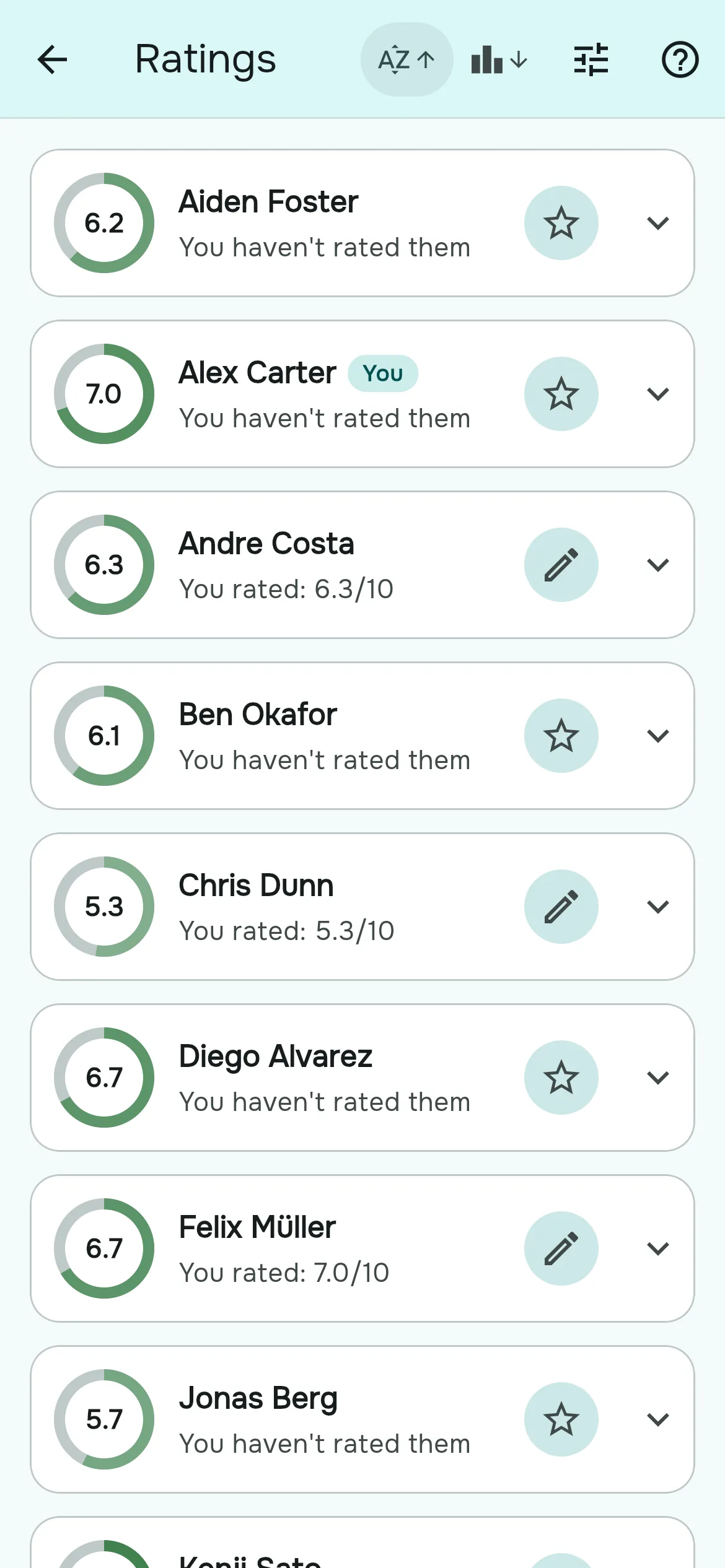
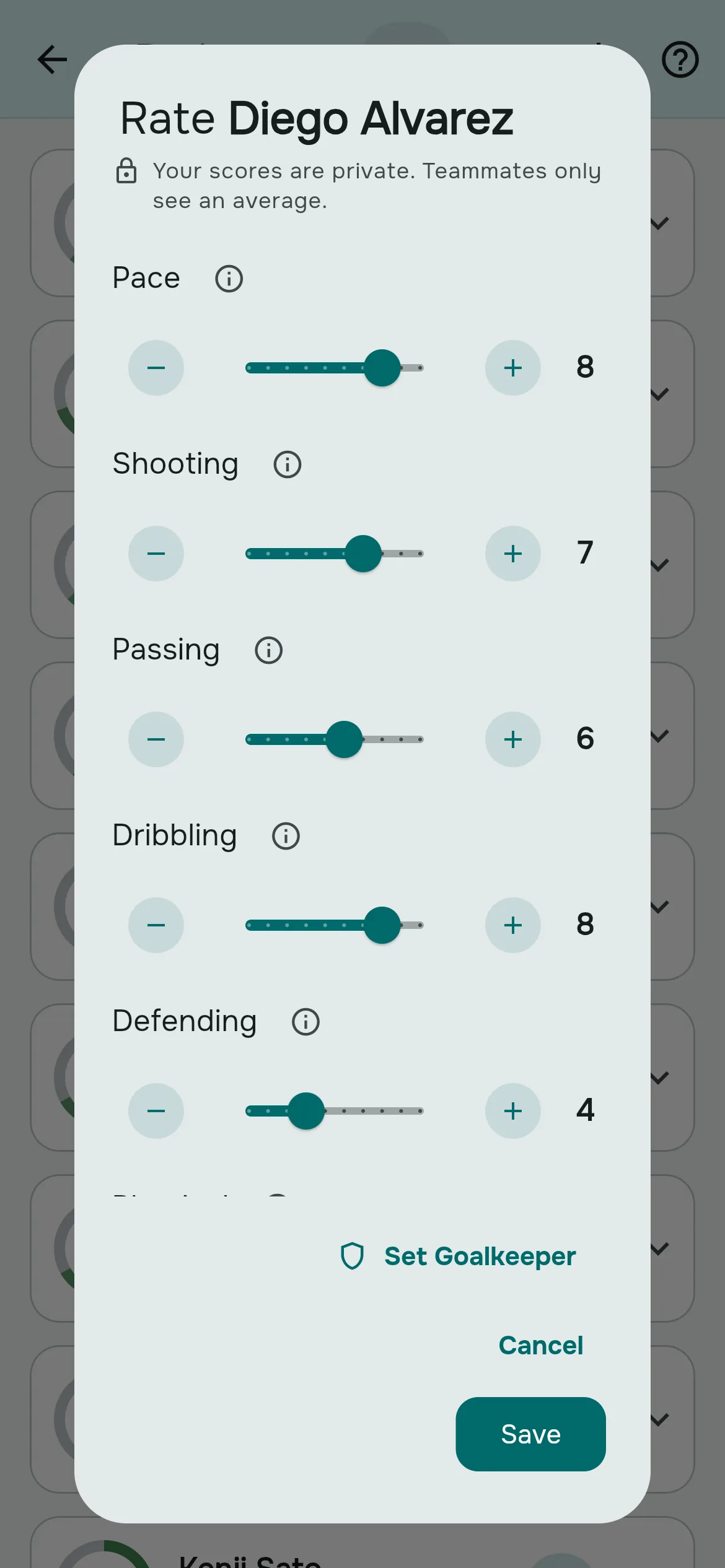
- Go to the Group tab and tap Ratings. You can also tap Rate now on the Home card that says how many members you haven't rated.
- On a player's card, tap Rate (a star on phones).
- For each skill, drag the slider or use the minus and plus buttons. Tap the ⓘ next to a skill to read what it covers.
- Tap Save. The card now reads "You rated: 7.0/10".
To change your mind later, tap Edit on the same card. The dialog opens with your previous scores; your new scores replace the old ones and you still count once in the average. You can rate yourself too, and it counts like anyone else's rating.
Read the group's ratings
- Each card shows the player's overall rating in a ring, in deeper green the higher it is. A player nobody has rated shows a dash and "No ratings yet".
- Under the name you see your own status: "You rated: 8.0/10", "You haven't rated them" or "No ratings yet".
- Tap a card to expand it and see the average for each skill.
- Use Sort by rating or Sort by name in the app bar; tap again to reverse.
How the overall rating is worked out
- Per skill: the average of everyone's score for that skill.
- Overall: the weighted average of those skill averages, using your group's skill weights. A skill with weight 2 counts twice as much as one with weight 1.
- Goalkeepers: in sports with a keeper, goalkeeping and outfield skills are averaged separately and blended by how much of a game the player spends in goal. See goalkeepers.
Every rater counts equally; there is no extra weight for the organizer. The number shown is worked out live, so changing a skill's weight changes everyone's overall rating straight away.
Choose who can rate
An organizer sets Ratings Access in Group Settings → Skills:
| Option | Who rates and sees the Ratings page |
|---|---|
| Everyone | Every member, players and non-players alike. |
| Admins Only | The owner and admins. Members don't see the Ratings tile. |
| Off | Nobody. Existing ratings are kept and the balancer still uses them. |
Who appears on the Ratings page
- Members marked as players. Someone who only manages the group can be marked "not playing" on the Members page and disappears from the list; their ratings are kept.
- Players without an account, added by the organizer, can be rated like anyone else.
- Guests don't appear. Their skills are entered once when they are added to a game and count only for that game.
Questions players ask
Can my teammates see what I gave them?
No. Only you can see the scores you gave. Everyone else, including the organizers, sees only the averages.
Can the organizer see who rated me low?
No. Admins and the owner can't read anyone's individual scores.
Should I use a 1 to 5 or a 1 to 10 scale?
Rostara uses 1 to 10 in whole numbers, which leaves room to separate the middle of a group, where most players are. Agree what 5 means (a solid regular in your group) and calibrate from there.
Can I change or delete a rating?
You can change it any time with Edit, and the new scores replace the old ones. Ratings can't be deleted, only changed.
Can I rate myself?
Yes, and it counts toward your average like anyone else's rating.
How do I rate someone I've only played with once?
Rate what you saw and leave skills you couldn't judge at 5, the middle of the scale. As more people rate them, the average settles.
Is the player told when someone rates them?
No. There are no notifications for ratings.
Why can't I see the Ratings page?
Your group's Ratings Access is set to Admins Only or Off. An organizer can change it in Group Settings → Skills.
Do ratings decide the teams?
They feed the team balancer, together with the skill weights and goalkeeper roles. Organizers can still move players by hand before publishing teams.