In this guide
Running a league or a cup for your pickup group usually means a spreadsheet: someone types the fixtures, works out the points after every game, and argues about goal difference at the end. In Rostara you pick a format, type the team names and tap one button. The app generates every fixture, ranks the table with the tiebreakers you chose, and shows everyone the current and next match.
The three tournament formats
When you create a tournament you choose one of three formats under Format:
| Format | What happens | Good for |
|---|---|---|
| Round robin (single) | Every team plays every other team once. Rounds are generated for you, and each team plays at most once per round. | A one-evening league, or a season where everyone meets once. |
| Round robin (double) | Every team plays every other team twice, home and away. The second leg mirrors the first after it finishes. | A longer season, or small leagues where one game each is not enough. |
| League and knockout | A group stage with 1, 2, 4 or 8 groups, followed by knockout rounds. With one group you get a final and a third-place match automatically; with more groups you design the knockout rounds yourself. | Cups, summer tournaments and anything that should end with a final. |
Fixtures are drawn at random when you tap Create: teams are shuffled, groups are drawn, and who plays at home is decided for each match. If you have an odd number of teams, one team sits out each round automatically. You will simply see that team missing from that round, with no "bye" match listed.
How many games is a round robin?
In a single round robin every team meets every other team once, so n teams play n × (n − 1) ÷ 2 games. With an even number of teams that takes n − 1 rounds; with an odd number it takes n rounds, because one team rests each round. A double round robin doubles the games.
| Teams | Games (single) | Rounds | Games per round | Games each team plays | Games (double) |
|---|---|---|---|---|---|
| 3 | 3 | 3 | 1 | 2 | 6 |
| 4 | 6 | 3 | 2 | 3 | 12 |
| 5 | 10 | 5 | 2 | 4 | 20 |
| 6 | 15 | 5 | 3 | 5 | 30 |
| 7 | 21 | 7 | 3 | 6 | 42 |
| 8 | 28 | 7 | 4 | 7 | 56 |
| 9 | 36 | 9 | 4 | 8 | 72 |
| 10 | 45 | 9 | 5 | 9 | 90 |
| 11 | 55 | 11 | 5 | 10 | 110 |
| 12 | 66 | 11 | 6 | 11 | 132 |
If you only have one pitch or court, multiply the number of games by your game length to see whether it fits the evening. Six teams and 15 games of 10 minutes is two and a half hours of football. For League and knockout, the form shows a live estimate before you create, for example "Est. 4 teams per group. Total 12 group matches." for 8 teams in 2 groups.
Which format for how many teams?
- 3 to 6 teams: a single round robin. Everyone plays everyone, and the table decides the winner.
- 4 to 6 teams with a big finish: League and knockout with one group. Everyone plays everyone, then first plays second in a final.
- 7 to 12 teams: League and knockout with two groups, then semi-finals and a final. A full round robin would be 21 to 66 games.
- A season of weekly games: a double round robin, so every pairing is played home and away.
Group tournaments and personal tournaments
There are two places a tournament can live:
- Group tournaments belong to your group. Every member can open them, follow the table and see the current match, and an unfinished one shows up on everyone's Home tab as an Active Tournament card. Only the group's owner and admins can create them and enter results. Find them on the Group tab under the Tournaments tile.
- Personal tournaments are yours alone. Nobody else can see them, which makes them handy for a one-off event, a school tournament you are refereeing, or trying the format out first. Open the menu (☰) and choose My Tournaments under Personal.
Create a tournament step by step
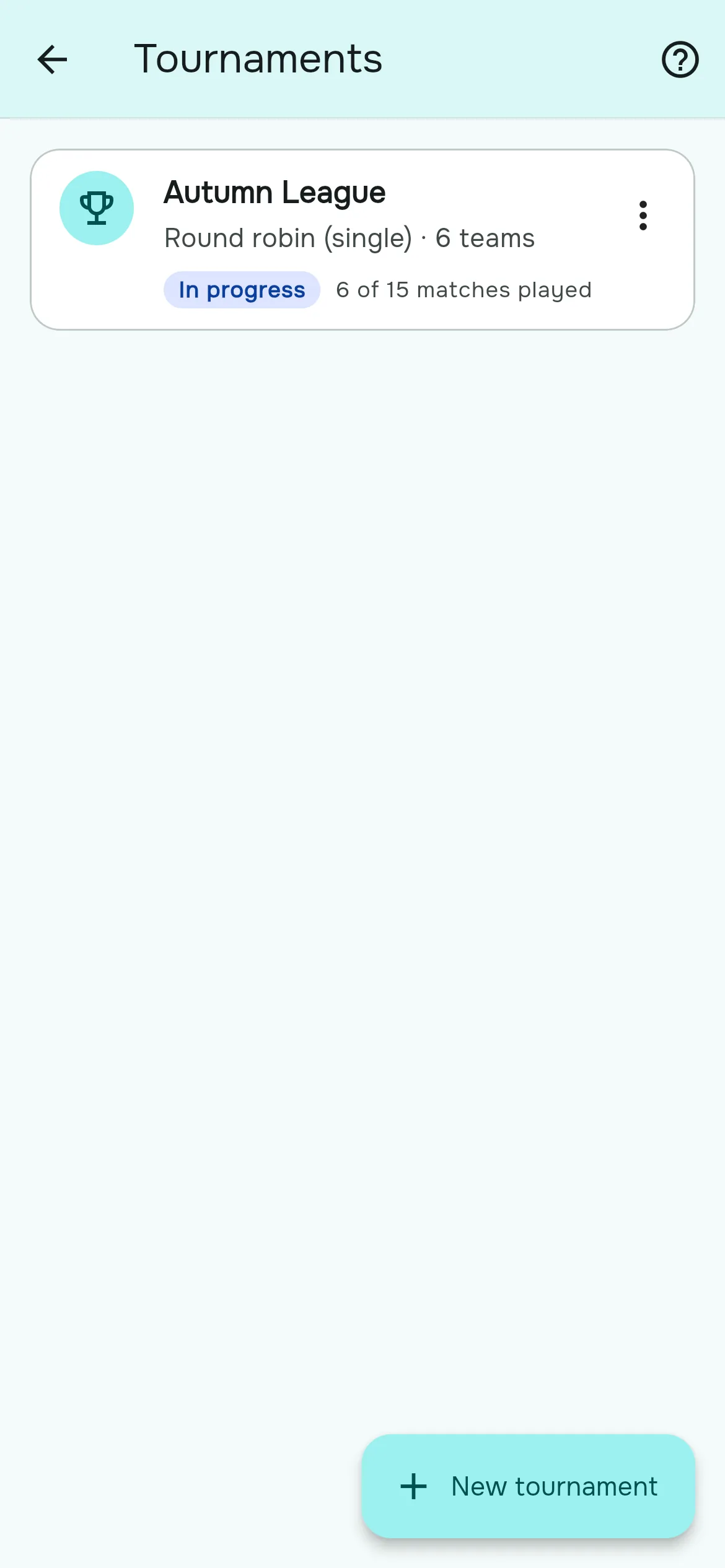
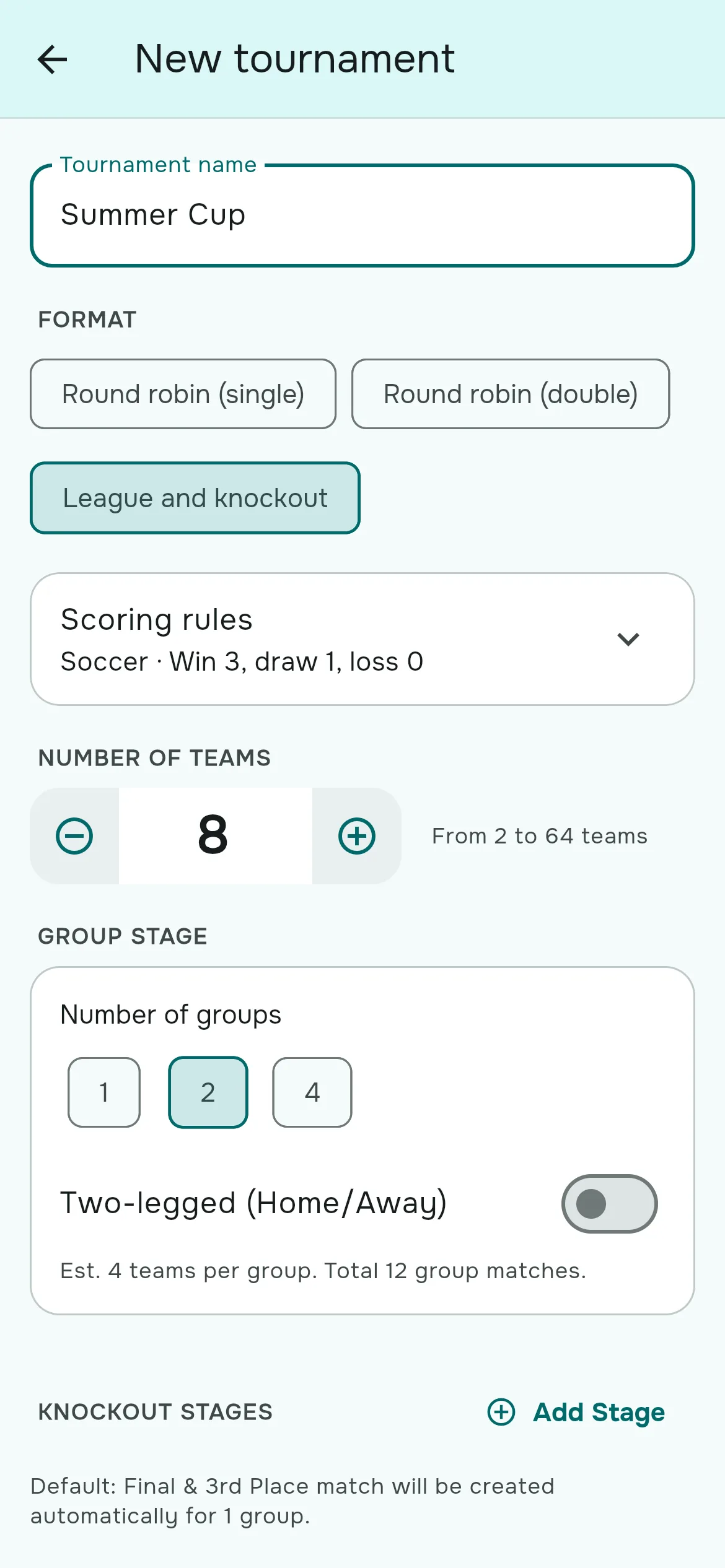
- Open Group → Tournaments (or ☰ → My Tournaments for a personal one) and tap New tournament.
- Type a Tournament name. It is required. If you leave it empty the form scrolls back up and asks you to "Give the tournament a name".
- Choose the Format: Round robin (single), Round robin (double) or League and knockout.
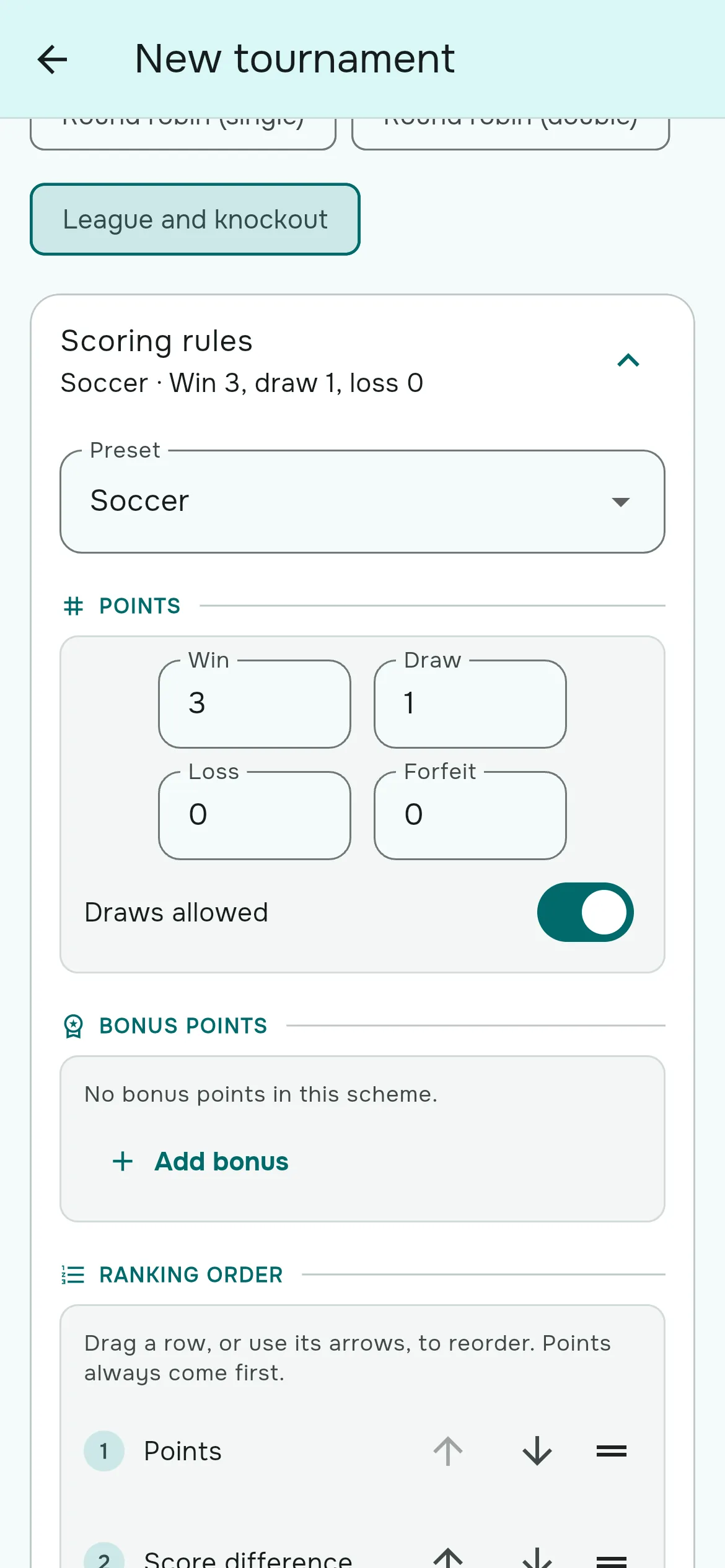
- Check the Scoring rules card. It starts from your group's sport, for example "Soccer · Win 3, draw 1, loss 0". Open it if you want to change points, bonus points or tiebreakers (see below).
- Set the Number of teams with the minus and plus buttons, or type it. Any number from 2 to 64 works.
- Name each team. The fields start as "Team 1", "Team 2" and so on; every team needs a name.
- For League and knockout, choose the Number of groups (1, 2, 4 or 8, up to half the number of teams) and switch on Two-legged (Home/Away) if each group should play home and away.
- Tap Create tournament. The tournament opens on its Standings tab, ready for the first result.
Choose the scoring rules
Every tournament carries its own scoring rules, copied in when you create it. Changing your group's sport later never rewrites a finished tournament's table. The Scoring rules card offers a Preset for each sport, and editing any value switches it to "Custom".
| Preset | Points (win / draw / loss) | Scores counted in | Table ranked by |
|---|---|---|---|
| Soccer | 3 / 1 / 0 | Goals | Points, then goal difference, head-to-head, goals scored |
| Basketball | no draws | Points | Win percentage, then head-to-head, score difference |
| Volleyball | 3 for a win, no draws | Sets, entered set by set | Points, then set ratio, point ratio, head-to-head |
| Handball | 2 / 1 / 0 | Goals | Points, then goal difference, head-to-head, goals scored |
| Padel | no draws | Games, entered set by set | Win percentage, then head-to-head, set ratio |
| Other | 3 / 1 / 0 | Points | Points, then score difference, head-to-head, total scored |
Futsal starts from the Soccer preset, ice hockey from Handball, and tennis from Padel. Inside the card you can change:
- Points: what a win, draw, loss and forfeit are worth, and whether draws are allowed. For sports ranked on win percentage there are no points to award.
- Bonus points: tap Add bonus to reward a result, for example a point for scoring at least four goals, for losing by one or less, for winning by three or more, or for a clean sheet. Bonus points get their own "BP" column in the table.
- Ranking order: drag the tiebreakers into the order you want, or use the move-up and move-down buttons. The list is applied from top to bottom.
- Score format: whether scores are goals, points, sets or games, how many sets a match is played to, and the highest score the result dialog will accept.
Design knockout rounds
With League and knockout and a single group, Rostara adds the playoffs for you: a final between first and second, and a third-place match between third and fourth. Use at least four teams so the third-place match can be played.
With two or more groups there is no automatic knockout, so you design it under Knockout stages. Here is a classic two-group cup with semi-finals and a final:
- Tap Add Stage and choose the Stage Type "Semi-Final".
- Tap Add Match twice. For the first semi, set Team A to Group Standing → Group A, position 1, and Team B to Group B, position 2. For the second, Group B position 1 against Group A position 2. Give them names like "Semi 1" and "Semi 2".
- Tap Add Stage again and choose "Final". Add one match with both sides set to Winner Of Match: Semi 1 and Semi 2.
- Add a "3rd Place Match" stage the same way with Loser Of Match if you want one.
Knockout slots show placeholders such as "1st Place Group A" or "Winner of Semi 1" until they can be filled. A group's slot fills when every match in that group has been played, and a "Winner of" slot fills when that match has a winner.
Enter and correct results
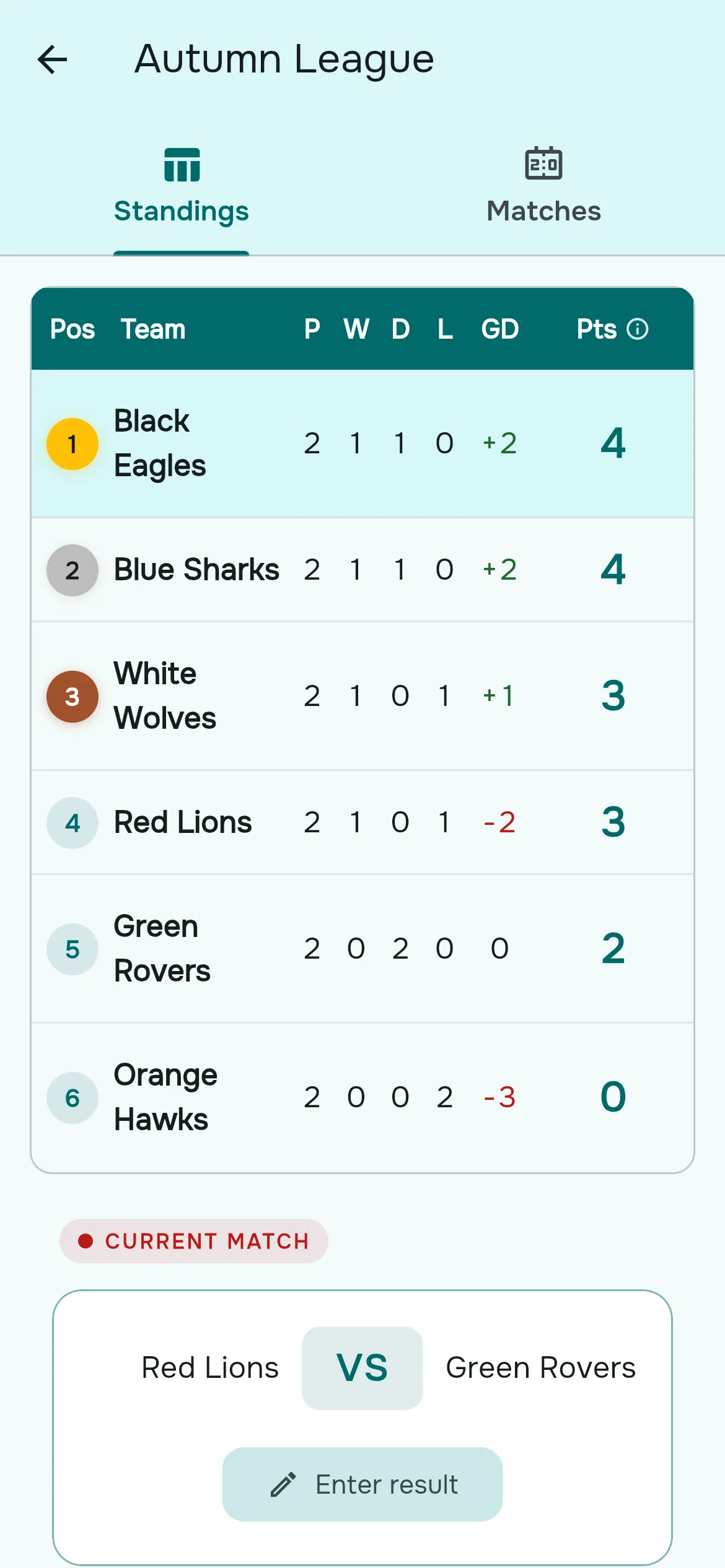
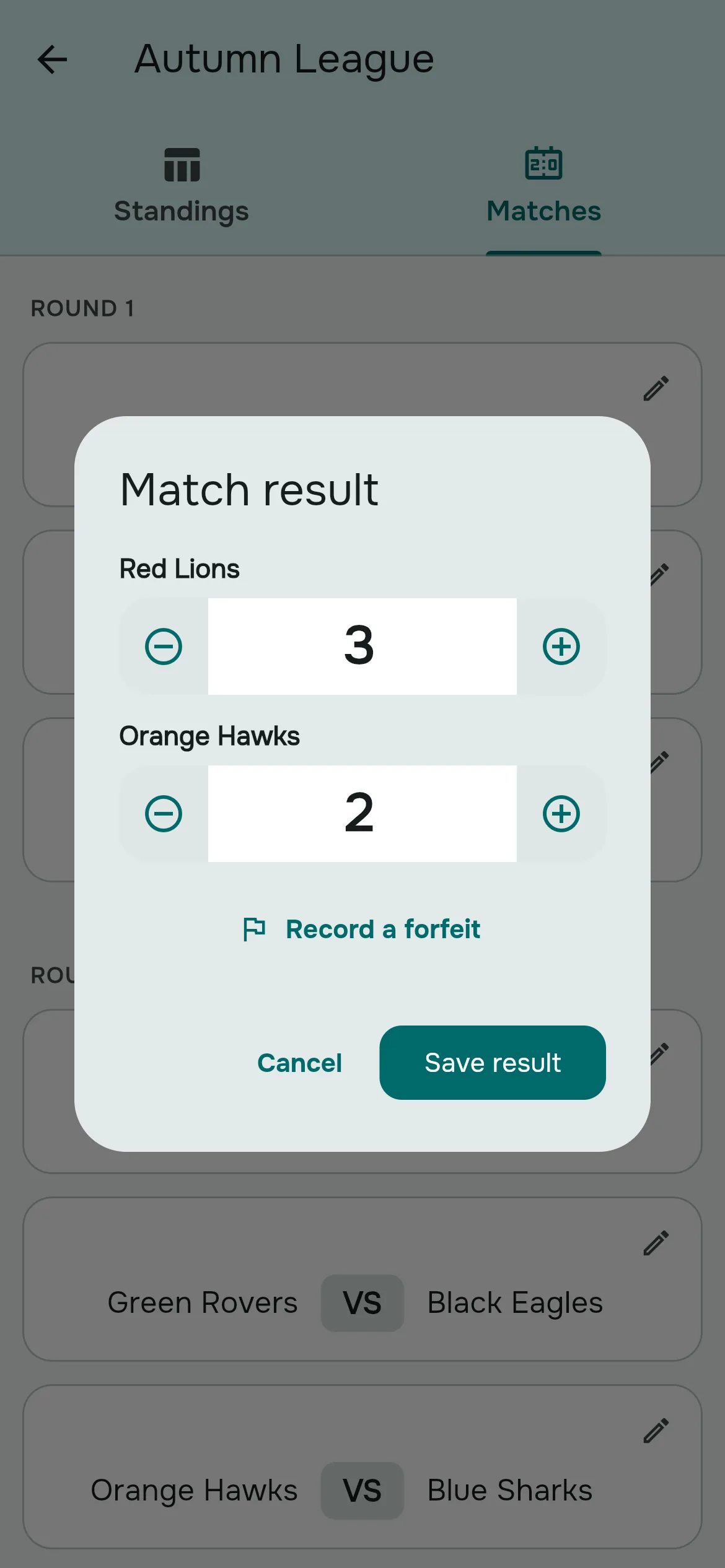
- Open the tournament. On the Standings tab, tap Enter result on the current match card, or go to the Matches tab and tap any match with a pencil.
- Set each side's score with the plus and minus buttons, or type it. For volleyball and padel, enter each set's score and the match score is worked out for you.
- Tap Save result. The table, the knockout slots and the current match update straight away for everyone watching.
To fix a mistake, tap the played match on the Matches tab again. It opens with the recorded score, which you can change at any time. A played match can't be turned back into an unplayed one.
Level scores in knockout matches
A knockout match has to produce a winner. If you save a level score, the dialog asks you to pick the team that went through, "on penalties, a shootout, extra time, or however it was settled". The score stays as you entered it, for example 1-1, and the team you picked advances.
No-shows and forfeits
If a team doesn't turn up for a group match, open the result and choose Record a forfeit, then the team that forfeited. The opponent gets the win and the preset's forfeit scoreline, for example 3-0 in soccer. In a knockout match, enter a score and pick who went through instead, so the next round fills in.
How the table is ranked
The standings show Pos, Team, P (played), W, D, L, the difference column (GD for goals, Diff otherwise), BP when you use bonus points, and finally Pts or Win%. The top three get gold, silver and bronze badges.
When teams are level, the tiebreakers in your ranking order are applied one after another. Head-to-head compares the tied teams' direct meetings: points first, then difference. Tap the Pts or Win% header to open "How standings are ranked", which spells out the exact rules for that tournament, so nobody has to argue about it at the bar.
With more than one group, the Standings and Matches tabs split into "Group A", "Group B" and so on. Group-stage matches are listed by round; knockout stages are listed in the order you designed them.
Three worked examples
A six-team league in one evening
Pick Round robin (single), set 6 teams and name them. You get 15 matches in 5 rounds, with three matches per round. If you have three pitches, play each round at the same time; the "current match" card always shows what is next.
An eight-team cup with semis
Pick League and knockout, 8 teams, 2 groups. That gives 12 group matches (four teams per group). Add a Semi-Final stage crossing the groups and a Final from the two semi winners, as described above.
Five teams, one rests each round
A single round robin with 5 teams gives 10 matches over 5 rounds. Each round, one team sits out automatically, and every team ends up playing four matches.
Good to know before you start
- Fixtures and groups are drawn at random; you can't hand-pick groups or the match order.
- Teams are names, not linked to your group's members, so player stats and top scorers aren't tracked.
- Matches don't have their own dates or venues. Schedule the day itself as a game in Events.
- Let one person enter scores at a time. Two admins saving at the same moment can overwrite each other.
- Correcting a group result after the knockout slot has filled doesn't re-seed the knockout, so finish group results before the knockouts start.
- To make balanced sides before the tournament, use the team balancer and then type the team names in.
Questions organizers ask
How do I make a round robin schedule for 6 teams?
Tap New tournament, pick "Round robin (single)", set the number of teams to 6, name the teams and tap Create tournament. Rostara generates all 15 matches in 5 rounds.
Can every team play each other home and away?
Yes. Pick "Round robin (double)". For a group stage, switch on "Two-legged (Home/Away)".
What happens with an odd number of teams?
One team rests each round automatically, so every team plays the same number of matches.
How do I run a league that ends with a final?
Pick "League and knockout" with one group. Rostara adds a final between first and second and a third-place match between third and fourth. Use at least four teams.
How are ties in the table broken?
By the ranking order in the tournament's scoring rules. For soccer that is points, goal difference, head-to-head, then goals scored. Tap the Pts header in the table to see the rules for any tournament.
Can I give 2 points for a win, or add bonus points?
Yes, before you create it: open Scoring rules, change the points for a win, draw and loss, or tap Add bonus. The rules can't be changed afterwards.
How do I record penalties in a knockout match?
Enter the level score, then pick the team that went through under "Level score". The shootout score itself isn't recorded.
Can my players see the table?
Yes. Every member can open group tournaments, see the standings and matches, and see the active tournament on their Home tab. Only the owner and admins enter scores.
Can I rename a team after creating the tournament?
No. Tournaments can't be edited once created. Delete it and create it again before any results are entered.
Does it work for volleyball sets or padel games?
Yes. The Volleyball and Padel presets take scores set by set and rank on set and point ratios or win percentage.
Can I run a tournament just for myself?
Yes. Open the menu and choose My Tournaments. Personal tournaments are private to you, free and unlimited.